Conditional Blocks – Advanced Content Visibility Control for WordPress
by Morgan Hvidt on WordPress.org
Easily show/hide WordPress blocks & widgets with powerful, no-code display logic. Perfect for restricting content. Explore advanced scheduling, Ge …
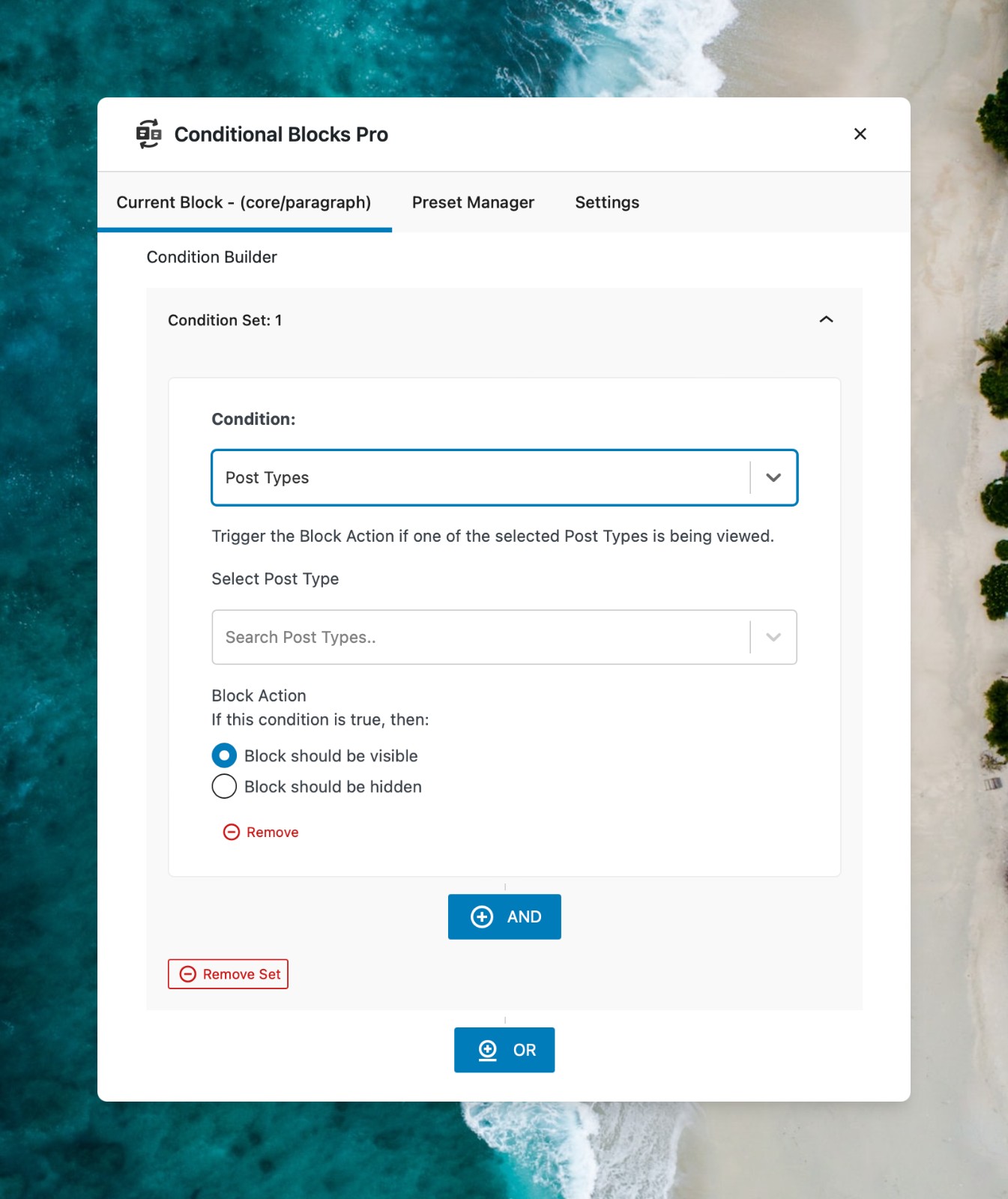
Conditional Blocks - Create Custom Visibility Conditions for WordPress Blocks.
Conditional Blocks is a powerful, no code plugin that allows you to control the visibility of any WordPress blocks within the Block Editor (Gutenberg) using advanced display logic.
Replace multiple plugins with our versatile Conditional Blocks, developed for fast paced freelancers and agencies.
🌏 Get the full overview on conditionalblocks.com
Create Better Sites with Less Plugins 🤩
Everything is block in modern WordPress development with Full Site Editing (FSE). In plain words, you apply conditional display logic to everything.
Here’s some example use-cases where Conditional Blocks shines.
- Dynamic headers, navigation and menus,
- Cart Messages
- CTA & Marketing sections
- Restrict content & Access control
- Membership content
- Content Control
- And much more..
What’s Included in Conditional Blocks FREE
The free version of Conditional Blocks offers 3 visibility conditions + The Conditions API for creating your own conditions .
- Lockdown condition:
Hide blocks from everyone, perfect for preparing new content or working on drafts. - User Status:
Display content exclusively for logged-in or logged-out users, ideal for membership site content. - Responsive designs:
Control block visibility on mobile, tablet, and desktop screens for responsive designs.
You can edit the CSS Breakpoints to match your theme too. - Developer Focused:
Create Custom Visibility Conditions for WordPress Blocks, such as custom user roles or membership levels. You can easily create your own integrations using code snippets.
The free version is limited.
Consider joining our PRO community to create better WordPress sites & support development.
The Full Toolkit with Conditional Blocks Pro ✨
Conditional Blocks Pro unlocks the full suite of advanced block visibility conditions and integrations, allowing you to create truly dynamic and personalized user experiences:
🎯 Advanced Audience Targeting (Pro)
- Geolocation: Target or exclude visitors based on their Country or Continent using their IP address. Ideal for region-specific content, offers, or compliance.
- User Role: Precisely control visibility for specific user roles (Admin, Editor, Subscriber, WooCommerce Customer, custom roles, etc.).
- Device & Browser: Tailor experiences by showing/hiding blocks based on device type (iPhone, Android, Tablet, Desktop) or browser (Chrome, Firefox, Safari, etc.).
- Referrer URL: Display unique content to visitors arriving from specific sources like Google, X/Twitter, or other websites.
⚙️ Dynamic & Automated Content (Pro)
- Scheduling: Automate your content calendar! Display blocks only during specific date ranges, times of day, or days of the week – perfect for sales, events, or timely announcements.
- Post Meta & Custom Fields: Leverage your existing data by showing or hiding blocks based on post meta or custom field values (including ACF).
- URL Query String: Create dynamic landing pages or respond to campaign parameters by controlling visibility based on URL query strings.
- HTTP Cookies: Adapt content based on visitor cookie values for advanced tracking or personalization (Pro).
- Content Specificity: Target blocks to specific Post IDs, URL paths, Post Types, Taxonomies (like categories or tags), and even specific Terms.
- User Meta: Personalize content based on individual user metadata.
- Archive Pages: Show or hide blocks specifically on WordPress archive pages.
🔌 Powerful Integrations (Pro)
Integrations are automatically available when the supported plugin is active.
- Advanced Custom Fields (ACF): Create hyper-personalized experiences by controlling block visibility based on your ACF field values. (Learn More)
- WooCommerce: Boost sales and improve shop UX! Show targeted messages based on cart total, products in cart, purchased products, or customer details. (Learn More)
- Easy Digital Downloads (EDD): Enhance your digital store with conditions based on cart value, purchased products, products in cart, or cart item categories. (Learn More)
- Paid Memberships Pro (PMPro): Easily restrict content based on membership levels, status, or specific user field data. (Learn More)
- MetaBox: Control block visibility based on the values stored in your MetaBox custom fields. (Learn More)
- ProfilePress: Restrict content visibility based on users’ active membership plans in ProfilePress. (Learn More)
- FluentCRM: Control block visibility based on FluentCRM user tags and contact lists. Perfect for targeted email marketing follow-ups. (Learn More)
- WP Fusion: Show or hide content based on WP Fusion tags synced from your CRM, enabling deep CRM-driven personalization. (Learn More)
- GTranslate: Display content conditionally based on the visitor’s selected language in GTranslate. (Learn More)
🚀 Workflow Boosters (Pro)
- Condition Presets: Save frequently used condition combinations and reuse them across your site with a single click.
- Custom PHP Logic: Implement highly specific or complex visibility rules using your own custom PHP functions.
- Combine with AND/OR Logic: Build sophisticated visibility rules by grouping multiple conditions with flexible AND/OR logic.
See all Conditional Blocks Pro features & integrations
Advanced Usage
Managing WordPress content via blocks becomes easier when you know the tips & tricks. You can find more on our blog.
Draft content on live pages
Use the Lockdown condition to create draft blocks inside live content, and simply remove the condition when you’re ready to publish. You don’t have to worry about people seeing the content before it’s complete. Using the Lockdown Condition eliminates need to create a separate draft page.
Apply Conditions to Groups
One of our favorite methods of managing WordPress content is to use Group Blocks. If you setup a Group Blocks you can set conditions directly the Group, this means that all nested blocks inside the Group will automatically follow the same visibility conditions.
Design Patterns
Yes it’s also possible to pre-make dynamic templates using Conditional Blocks. You’ll have to make use of the WordPress Design Patterns. Simply make a patterns as you’ve also done while applying the visibility rules.
The patterns will be ready and be conditionally displayed when you insert it on a page. We personally use the same method on Synced Patterns too. (Previously known as Reusable Blocks in Gutenberg).
Restrictive content made easy
Control access to any block by clicking on it within the Block Editor and using the Condition Builder to add visibility rules. Perfect for members-only content.
Responsive designs simplified
Effortlessly adapt your blocks for mobile, tablet, or desktop display, automatically showing or hiding content according to screen sizes.
LEARN MORE
- Get Pro: See pricing & go Pro today.
- Documentation: Learn how to set up and use our features.
- Blog: Read our guides and tutorials.
- Website: Find out more about us and the PRO version.
- X (Twitter): Follow us on X.
MORE Block Plugins
- Find My Blocks: Locate all instances of blocks across your WordPress pages.
Compatibility
Conditional Blocks works with any theme or plugin that uses the WordPress Block Editor (also known as Gutenberg). Block widget & Full Site Editing (FSE) within themes are also supported.
Tested and compatible with:
- Stackable Blocks
- Spectra Blocks
- Atomic Blocks
- CoBlocks
- Editorskit
- WooCommerce Blocks (Product Blocks)
- Easy Digital Downloads Blocks
- Ultimate Addons for Gutenberg
- Otter Blocks & Templates
- GenerateBlocks
- Kadence Blocks
- Kadence Theme
- Genesis Blocks
- Twenty Twenty-Two theme
- Twenty Twenty-Four theme
- Wabi theme
- Poe theme
- WooCommerce Storefront
- WordPress Site Editor
- Gutenberg
- WordPress Site Templates
- OllieWP theme
For support or help with other plugins, please get in touch.