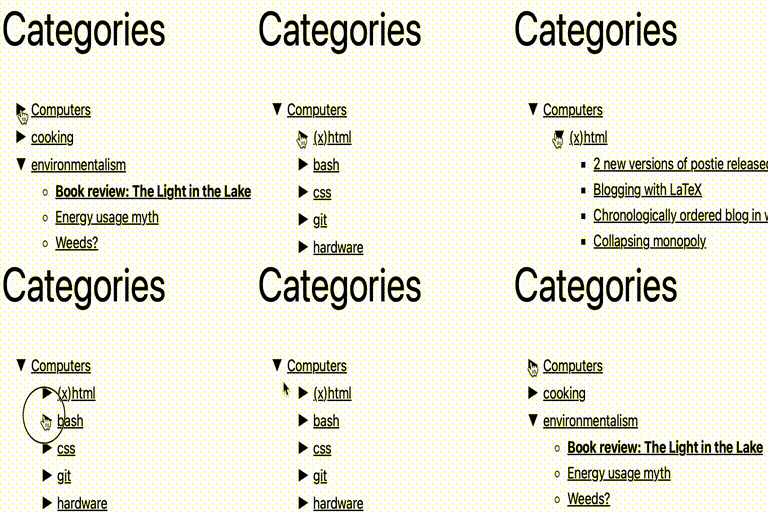

a few expanded categories with default theme, showing nested categories
Collapsing Categories creates an expandable list of categories and
subcategories. It can also expand to show posts. The primary usage is as a
widget, but you can also use the code in your theme manually if you wish (see
installation instructions)
Options
Options can be set
from the block panel. If you wish to insert the code into your theme manually
instead of using a widget, you can use the following options. These options
can be given to the collapsCat() function either as an array or in query
style, in the same manner as the wp_list_categories function.
$defaults=array(
   'showPostCount' => true,
   'inExclude' => 'exclude',
   'inExcludeCats' => '',
   'showPosts' => true,
   'showPages' => false,
   'linkToCat' => true,
   'olderThan' => 0,
   'excludeAll' => '0',
   'catSortOrder' => 'ASC',
   'catSort' => 'catName',
   'postSortOrder' => 'ASC',
   'postSort' => 'postTitle',
   'expand' => '0',
   'defaultExpand' => '',
   'postTitleLength' => 0,
   'accordion' => 0,
   'catfeed' => 'none',
   'taxonomy' => 'category',
   'showPostDate' => false,
   'postDateAppend' => 'after',
   'postDateFormat' => 'm/d',
   'useCookies' => true,
   'showTopLevel' => true,
   'postsBeforeCats' => false,
   'expandCatPost' => true,
   'debug'=>'0'
);
- inExclude
- Whether to include or exclude certain categories
- ‘exclude’ (default)
- ‘include’
- Whether to include or exclude certain categories
- inExcludeCats
- The categories which should be included or excluded
- showPages
- Whether or not to include pages as well as posts. Default if false
- linkToCat
- 1 (true), clicking on a category title will link to the category archive (default)
- 0 (false), clicking on a category title expands and collapses
- catSort
- How to sort the categorys. Possible values:
- ‘catName’ the title of the category (default)
- ‘catId’ the Id of the category
- ‘catSlug’ the url of the category
- ‘catCount’ the number of posts in the category
- ‘catOrder’ custom order specified in the categorys settings
- How to sort the categorys. Possible values:
- catSortOrder
- Whether categories should be sorted in normal or reverse
order. Possible values:- ‘ASC’ normal order (a-z 0-9) (default)
- ‘DESC’ reverse order (z-a 9-0)
- Whether categories should be sorted in normal or reverse
- postSort
- How to sort the posts. Possible values:
- ‘postDate’ the date of the post (default)
- ‘postId’ the Id of the post
- ‘postTitle’ the title of the post
- ‘postComment’ the number of comments on the post
- ‘postOrder’ sort by menu order
- How to sort the posts. Possible values:
- postSortOrder
- Whether post should be sorted in normal or reverse
order. Possible values:- ‘ASC’ normal order (a-z 0-9) (default)
- ‘DESC’ reverse order (z-a 9-0)
- Whether post should be sorted in normal or reverse
- expand
- The symbols to be used to mark expanding and collapsing. Possible values:
- ‘0’ Triangles (default)
- ‘1’ + –
- ‘2’ [+] [-]
- ‘3’ images (you can upload your own if you wish)
- ‘4’ custom symbols
- The symbols to be used to mark expanding and collapsing. Possible values:
- customExpand
- If you have selected ‘4’ for the expand option, this character will be
used to mark expandable link categories
- If you have selected ‘4’ for the expand option, this character will be
- customCollapse
- If you have selected ‘4’ for the expand option, this character will be
used to mark collapsible link categories
- If you have selected ‘4’ for the expand option, this character will be
- postTitleLength
- Truncate post titles to this number of characters (default: 0 = don’t
truncate)
- Truncate post titles to this number of characters (default: 0 = don’t
- accordion
- When set to true, expanding one category closes all others at that level
- catfeed
- Whether to add a link to the rss feed for a category. Possible values:
- ‘none’ (default)
- ‘text’ shows RSS
- ‘image’ shows an RSS icon
- Whether to add a link to the rss feed for a category. Possible values:
- taxonomy
- Type of taxonmy to display. Possible values:
- ‘category’ (default)
- ‘link_category’
- ‘post_tag’
- ‘both’ (categories and tags)
- any other registered taxononmy (e.g. recipe press uses recipe-categories)
- Type of taxonmy to display. Possible values:
- showPostDate
- When true, show the date of each post
- postDateAppend
- Show the date before or after the post title. Possible values:
- ‘after’ (default)
- ‘before’
- Show the date before or after the post title. Possible values:
- postDateFormat
- What format the post date is in. This uses the standard php date
formatting codes
- What format the post date is in. This uses the standard php date
- useCookies
- When true, expanding and collapsing of categories is remembered for each
visitor. When false, categories are always display collapsed (unless
explicitly set to auto-expand). Possible values:- 1 (true) (default)
- 0 (false)
- When true, expanding and collapsing of categories is remembered for each
- showTopLevel
- When set to false, the top level category will not be shown. This could
be useful if you only want to show subcategories from one particular
top-level category- 1 (true) (default)
- 0 (false)
- When set to false, the top level category will not be shown. This could
- postsBeforeCats
- When set to true, posts in category X will be ordered before
subcategories of category X- 1 (true)
- 0 (false) (default)
- When set to true, posts in category X will be ordered before
- expandCatPost
- When set to true, any category to which a post is assigned will
automatically be expanded on a single post page.- 1 (true) (default)
- 0 (false)
- When set to true, any category to which a post is assigned will
- showEmptyCat
- When set to true, empty categories are shown
- 0 (false) (default)
- 1 (true)
- When set to true, empty categories are shown
- debug
- When set to true, extra debugging information will be displayed in the
underlying code of your page (but not visible from the browser). Use
this option if you are having problems
- When set to true, extra debugging information will be displayed in the
Examples
collapsCat('catSort=ASC&expand=3&inExcludeCats=general,uncategorized')
This will produce a list with:
* categories shown in alphabetical order
* using images to mark collapsing and expanding
* exclude posts from the categories general and uncategorized
`
echo '
- ‘ . “\n”;
if (function_exists(‘collapsCat’)) {
collapsCat(array(
‘postSort’ => ‘postDate’,
‘postSortOrder’ => ‘DESC’,
) );
} else {
wp_get_categories(‘your_options_here’);
}
echo “
\n”;
?>
`
Demo
I use this plugin in my blog at http://robfelty.com
CAVEAT
Currently this plugin relies on Javascript to expand and collapse the links.
If a user’s browser doesn’t support javascript they won’t see the links to the
posts, but the links to the categories will still work (which is the default
behavior in wordpress anyways)


