
Coding Blocks
by Simon Ugorji on WordPress.org
code block, syntax highlighter, code highlighter, editor, php, html, css, javascript, python, java, jsx, react, snippet, highlight, syntax, github, p …
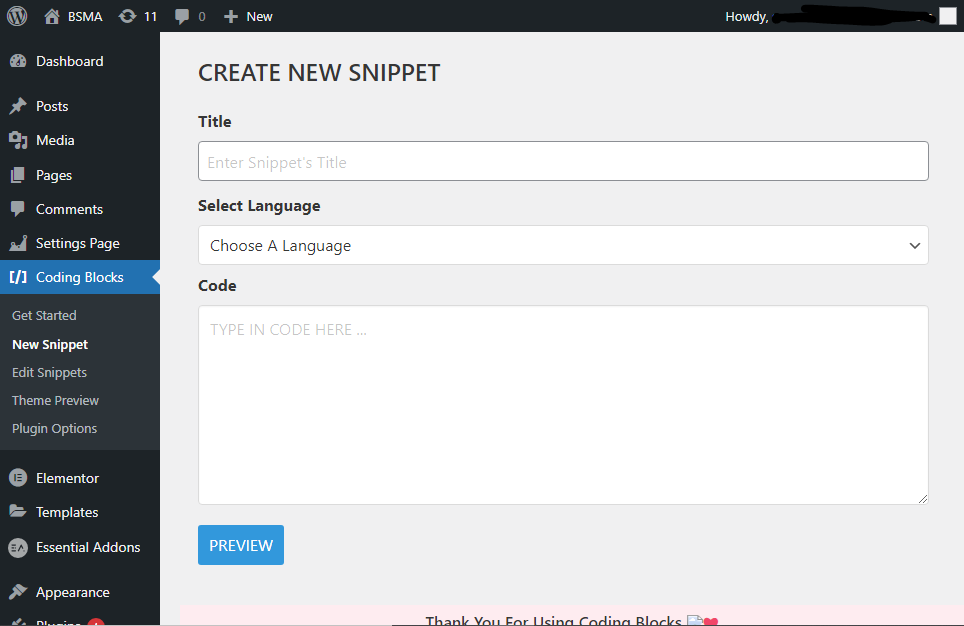
This is the Screenshot of the page where you create a new snippet.
PLEASE NOTE THAT THIS PLUGIN DOES NOT AND WILL NEVER EXECUTE ANY TYPE OF CODE ON YOUR WORDPRESS SITE!
This plugin uses Google Prettify which is an open-source syntax highlighting library.
This plugin relies on 3rd party services under the circumstances below;
-
Syntax highlighting – This is the core library that will make your snippets to be formatted according to your chosen language.
-
Color Themes – This is the color themes that can be used to change what your code snippets looks like
You can find the Terms of Use and privacy policy on the links above.
HOW TO USE
CREATE A NEW SNIPPET
- Head Over to the New Snippet page to create a New Code Snippet.
- On the page, add a title for the new snippet.
- Select the Language you’re working with.
- Type in the code in the code box and when you’re done, click on Preview.
- Click on Save to save your code snippet.
NOTE: YOUR CODE SNIPPETS ARE ENCODED AND STORED AS PLAIN TEXT TO PREVENT ITS EXECUTION
MANAGE CODE SNIPPETS
- Head Over to the All Snippets page to view existing code snippets.
- You can click on the Copy button to copy the shortcode for the snippet.
- You can click on the Edit button to edit a code snippet.
- You can click on the Delete button to delete a code snippet.
EDIT CODE SNIPPET
- Head Over to the All Snippets page to view existing code snippets.
- Click on the Edit button to redirect you to the edit page.
- On the Edit page, change the title for the snippet.
- Change the Language you’re working with.
- Modify the code in the code box and when you’re done, click on Update.
EMBED CODE SNIPPET
- Head Over to the All Snippets page to view existing code snippets.
- Click on the Copy button to copy the shortcode for the snippet.
- In any of your wordpress posts, place the copied shortcode & save the post.
- Preview the post to see the snippet embedded right where you want it.


