
CMS Tree Page View
by Pär Thernström on WordPress.org
Adds a tree view of all pages & custom posts. Get a great overview + options to drag & drop to reorder & option to add multiple pages.
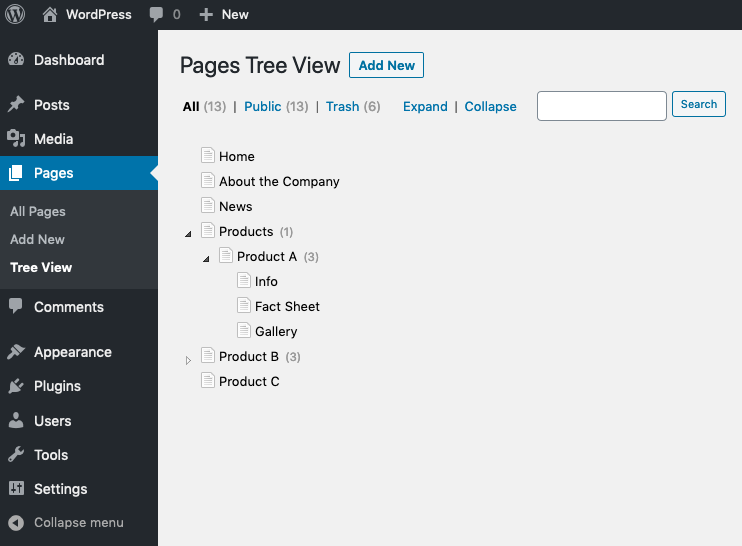
The page tree in action
Adds a CMS-like tree overview of all your pages and custom posts to WordPress – much like the view often found in a page-focused CMS.
Also check out OrganizeWP if your goal is to incorporate multiple content types into a single view!
Within this tree you can edit pages, view pages, add pages, search pages, and drag and drop pages to rearrange the order.
CMS Tree Page View is a good alternative to plugins such as pageMash, WordPress Page Tree and My Page Order. For multiple content types and other new features check out OrganizeWP as well.
Page management in WordPress won’t get any easier than this!
Features and highlights:
- View your pages & posts in a tree-view, like you view files in Windows Explorer or the Finder in OS X
- Drag and drop to rearrange/order your pages
- Add pages after or inside a page
- Add multiple pages at once – perfect for setting up a new site structure
- Edit pages
- View pages
- Search pages
- Available for both regular pages and custom posts
- Works with both hierarchical and non-hierarchical post types
- View your site hierarchy directly from the WordPress dashboard
- Drag and drop between trees with different post types to change to post type of the draged item, i.e. change a regular page to became any custom post type
- Support for translation plugin WPML, so you can manage all the languages of your site
Show your pages on your site in the same order as they are in CMS Tree Page View
To show your pages on your website in the same order as they appear in this plugin, you must
sort them by “menu order”.
// Example using query_posts
$args = array(
  'post_type' => 'page',
  'orderby'=> 'menu_order',
  'order'=>'ASC',
);
$posts = query_posts($args);

// Example using wp_query
$args = array(
    'post_type' => 'page',
    'orderby' => 'menu_order',
    'order' => 'ASC',
);
$query = new WP_Query( $args );
Screencast
(An updated screencast is coming soon!)
Watch this screencast to see how easy you could be managing your pages:
Translations/Languages
This plugin is available in the following languages:
- English
- German
- French
- Spanish
- Russian
- Belorussian
- Swedish
- Czech
- Italian
- Dutch
- Hungarian
- Norwegian
- Polish
- Greek
- Danish
- Lithuanian
- Estonian
- Finnish
- Japanese
- Ukrainian, by getvoip.com
- Slovak
Always show your pages in the admin area
If you want to always have a list of your pages available in your WordPress admin area, please check out the plugin
Admin Menu Tree Page View.
Donation and more plugins
- Check out my other plugin Simple History if you want to see a log of changes in your WordPress admin. With Simple History you can see login attempts (both failed and sucessful), page changes, plugin updated, and more. It’s a great way to view user actions on your site!
- If you like this plugin don’t forget to donate to support further development.


