
CBX Poll
by Sabuj Kundu on WordPress.org
CBX Poll plugin helps to create poll system for WordPress with all possible features. CBX Poll is developed thinking all the basic and advance need for a poll system in wordpress eco system. The plugin is developed thinking both user and developer in mind so that it can be customized easily using simple hook and filter system of wordpress.
Polls can be created as text, photo, video, audio, html. Both Logged in and guest users can vote for poll. Logged in users can submit poll from frontend as pro feature.
CBX Poll by Codeboxr
📺 Live Demo | >📺 Learn More | 🌟 Upgrade to PRO | 📋 Documentation | 👨💻 Free Support | 🤴 Pro Support
Note: full source code(including scss files) available at Github Repo
🛄 Core Plugin Features
- CBX Poll is a custom post type cbxpoll
- Unlimited questions, each question has different color option and text based title, We call it Text Answer
- Pro version has different type of answer type like audio, video etc or this answer type is hackable or hookable
- IP and Cookie checking system to restrict repeated voting for guest
- Guest can not vote changing ip or cookie using same email address
- Grid or List based answer display
- Poll vote user access control
- Poll result user access control
- Poll Expire control
- Single Answer or Multi Answer Vote (Vote selecting multiple answer)
- Poll display system (Text based display in core, more display ways possible using hook)
- Global poll setting
- Individual poll setting
- Shortcode to display single poll
- Shortcode to display poll listing using ajax pagination
- Widget to show a single poll with setting, more widget will come eventually
- The best way to check the features is to use the plugin yourself as it’s free and distributed via wordpress plugin dir, if you don’t like delete and forget.
- We accept your feedback, ask us a feature that it should have, we will implement and release a new version. If the features is not compatible for free version we will add in pro addon which help us to run company.
- Elementor widget support
- Gutenberg block support
▶️ Watch Video
🀄 Widgets
- Classic Widget
- Elementor support (From v1.1.9)
🧮 Shortcodes
- Shortcode Format:
[cbxpoll id=""]
💎 CBX Poll Pro Features
👉 Get the pro addon
- Extra answer type: Audio, video, photo, rich content/html content as answer (For every answer type plain answer title and color will be available)
- Gallery system for images. Even audio, video can be set in gallery mode(Good fit for grid view)
- Custom audio, video file for audio and video answer using the wordpress native audio video player
- Social media video like youtube, vimeo, dailymotion, soundcloud etc are possible with audio, video type post
- Buddypress Integration
- Extra Result display: Twitter Style
- Extra Result display: Pie Chart Style
- Poll result log manager with delete feature
- Guest Vote control
- Guest email verify
- Comment as extra field(optional)
- Guest Name and Guest Email(optional)
- myCred integration for credit user or poll author, myCred setting
- [New] Frontend dashboard for creating poll from frontend with approval and other features.
- You need any more features ? Let us know, we will implement either in free core version or in pro addon.
💎 CBX Poll Pro Custom Integration
- Gamipress
- Uncanny Automator
🧮 Guest user Login Integrations
- WordPress Core Login form (Core)
- Login/register integration with WooCommerce(pro)
- Login/register integration with Restrict Content Pro(pro)
- Login/register integration with bbPress(pro)
- Login/register integration with BuddyPress(pro)
▶️ Watch Video
🔩 Installation
- [WordPress has clear documentation about how to install a plugin].(https://codex.wordpress.org/Managing_Plugins)
- After install activate the plugin “CBX Poll” through the ‘Plugins’ menu in WordPress
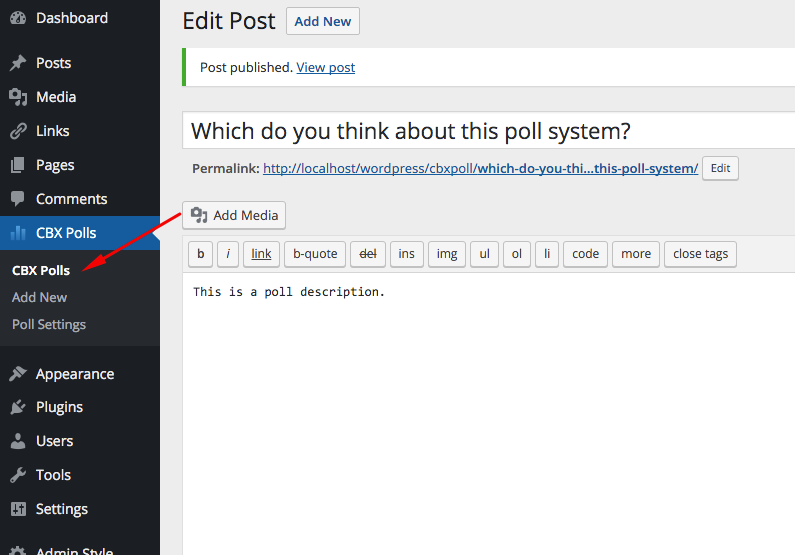
- You’ll now see a menu called “CBX Poll” in left menu, start from there, check the setting menu of CBX Poll then create a new poll
- Use shortcode or widget as you need.
- If need try our pro addon for extra features