
Calculated Fields Form
by codepeople on WordPress.org
The CFF plugin allows you to create both simple and professional forms. Its form builder includes dynamic calculated fields and many other controls.
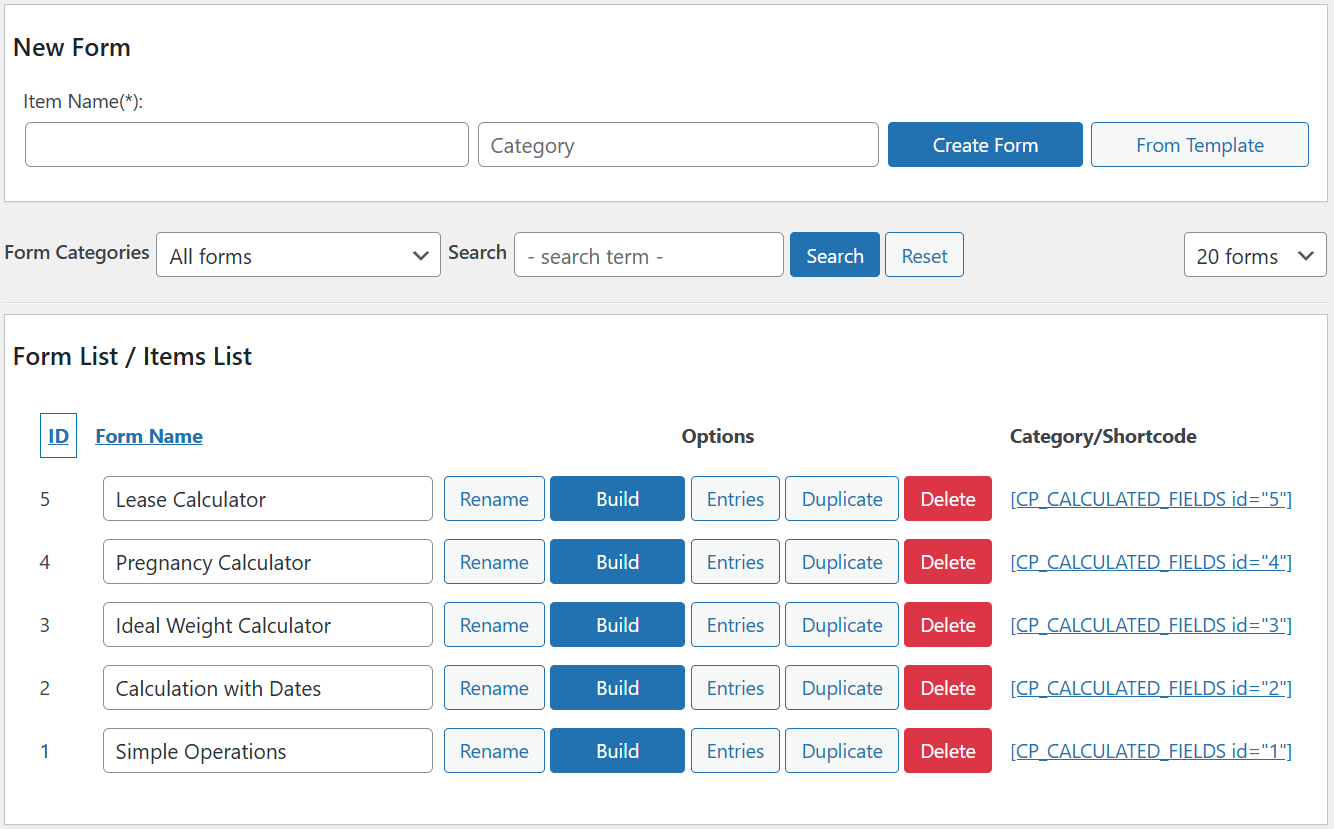
Calculated forms list
Absolutely! The “Calculated Fields Form” plugin opens up a world of possibilities. Here’s a breakdown of what you can achieve:
Financial Calculations: Design forms that automatically compute totals, taxes, discounts, and other financial metrics.
Booking Forms: Seamlessly handle date operations, availability checks, and booking calculations.
Product Pricing: Dynamically calculate product prices based on user inputs or predefined rules.
Math Operations: Perform basic arithmetic, percentages, and complex mathematical functions.
Text Processing: Manipulate text fields, concatenate strings, and format data.
Date Operations: Handle date differences, age calculations, and time-related tasks.
Advanced Operations:
Distance Calculations: Compute distances between locations.
Chart Generation: Create charts dynamically based on form data.
Third-Party Service Integration: Call external APIs or services for real-time data retrieval.
And the best part? All resulting forms are mobile responsive, ensuring a seamless experience across devices.
The most remarkable aspect is that you don’t need to hire a developer to create forms. With basic knowledge, you can have professional forms in minutes.
The form builder is entirely visual, offering a wide selection of controls (Text fields, Numbers, Currency, Date/time, Slider control, Email, Radio buttons, Checkboxes, Container fields, Multi-page control, QR code reader, Recording, Calculated fields, and many others). This versatile toolkit empowers you to create customized forms effortlessly.
And its new AI assistant provides exceptional support for developing complex calculation formulas and designing custom forms with ease.
Features
Main features:
- Visual form builder with an intuitive and interactive interface.
- Includes general-purpose controls such as radio buttons, checkboxes, menu lists, date fields, slider controls, numeric fields, text currency fields, etc.
- Includes calculated fields whose values result from operations involving other form fields.
Insert as many calculated fields in the form as you need. - Contains an advanced formula editor associated with the calculated fields with syntax highlighting and error detection.
- Features many operations modules: mathematical operations, operations with dates, financial operations, distance operations, text management, operations for calling remote services, etc. The calculated fields can identify numbers and prices within the values of the fields.
- Send notification emails with the data collected by the form.
- Distributed with several predefined forms that you can use as a starting point for your projects.
- Includes several design templates.
- Supports multi-pages forms by inserting page break controls between fields belonging to different pages.
- Possible to define dependency rules between fields in the form, which is very useful in the design of wizards.
- Allows the grouping of fields inside container controls (Div, Fieldset, and Popups).
- Enables formatting the form into columns for a more organized layout.
The “Calculated Fields Form” plugin includes integration with popular page builders:
- Classic WordPress Editor
- Gutenberg Editor
- Elementor
- Page Builder by SiteOrigin
- Beaver Builder
- WPBakery Page Builder
- DIVI Builder
For other editors, it is possible to insert the form into the pages via its shortcode. Each web form has an associated shortcode that allows you to insert it wherever you want.
[CP_CALCULATED_FIELDS id="1"]
Other features:
- From the plugin configuration page, it is possible to duplicate a form by pressing the “Duplicate” button associated with it. By dupplicating a form, you can reuse the work already done.
- Includes a troubleshooting and optimization area.
- Allows you to disable forms in the indexing process to improve the speed of the website.
- Includes a version control in the forms to recover previous versions.
Predefined forms:
“Calculated Fields Form” comes with dozens of predefined forms that you can select during the form creation process, or you can build new forms from scratch.
Calculated Fields Form Commercial
The free version of the “Calculated Fields Form” plugin provides essential functionality, including sending notification emails to the website owner with the form data, basic operations for use with equations, and core features such as customizing form design, setting up conditional fields, and modifying the form layout. More advanced distributions, Professional, Developer, and Platinum, come with additional capabilities such as sending copy emails to form users, integration with payment gateways and external services, controls for managing database connections (including links to external data sources like Google Sheets in CSV format), and a variety of complex operations. All commercial versions are available as a one-time purchase with lifetime access to plugin updates. ( https://cff.dwbooster.com/download )
Features of the Professional version:
The commercial plugin versions are one-time purchase with lifetime access to plugin updates ( https://cff.dwbooster.com/download )
- Includes all the features of the free version of the plugin.
- Submit the data collected by the forms and store it on the website for review.
- Send confirmation emails to the users with the data collected by the form.
- Integrate the form with PayPal and Stripe. Dynamically compute the charge amount using a calculated field.
Payments allow SCA (strong customer authentication), compatible with the new payment services (PSD 2) – Directive (EU). - Export and import forms between different WordPress sites.
- Different mechanisms to protect forms, such as captcha, WordPress nonces, and honeypot fields.
- Associate “Thank You” page with the form, where you can show a summary of the form’s submission.
- Dashboard widget to show the last week’s submissions.
- Cache the forms to increase the rendering speed.
- Export the information submitted by the forms to a CSV file and use it with third-party tools such as Excel, OpenOffice, LibreOffice, or any other spreadsheet editor.
Features of the Developer version:
- Includes all the features of the free and Professional version of the plugin.
- Advanced controls that connect to different data sources (databases, CSV files, posts, taxonomies, user information, and JSON objects).
- Financial operations module.
- Date and time operations module.
- Distance and travel time operations module uses “Google Maps”.
- Chart.js operations module to generate charts with the form data. Uses the ChartJS.org library.
- A script that allows the developer to save the data collected by the form in an external database.
Includes add-ons to extend the form features and make use of third-party plugins and external services
- Server-Side Equations add-on: Run equations on the server for better performance and security.
- Verification Code add-on: Email and phone verification with code input before form submission.
- WooCommerce add-on: Link forms to WooCommerce products to calculate prices, weight, and dimensions.
- SalesForce add-on: Sync form data with your SalesForce account.
- WebHooks add-on: Send form data to WebHook URLs; connect with Zapier, IFTTT, and more.
- User Permissions add-on: Restrict form access and let users manage their submissions.
- User Registration Form add-on: Create user sign-up forms
Features of the Platinum version:
- Includes all the features of free, Professional, and Developer versions of the plugin.
Extending features add-ons
- CSV Generator add-on: Exports form data to CSV files and attaches them to notification emails.
- PDF Generator add-on: Creates PDF documents from form data and includes them in notification emails.
- Signature add-on: Converts fields into signature fields so users can sign using a mouse or touchscreen.
- Unique Fields Values add-on: Ensures users enter values that haven’t been used in previous submissions.
- iCal add-on: Sends iCal attachments in emails for importing events into Google Calendar, Outlook, and more.
- Upload Files add-on: Saves uploaded files to the WordPress media library and supports additional file types.
Payment Gateways add-ons
- PayPal Pro add-on: Accept credit card payments directly on your site, no redirection to PayPal.
- PayPal Checkout add-on: Integrates PayPal Checkout with support for more payment methods than PayPal Standard.
- Revolut add-on: Accept payments through Revolut.
- Authorize.Net add-on: Accept payments through Authorize.Net.
- Stripe add-on: Accept payments using the Stripe payment gateway.
- Stripe Checkout add-on: Uses Stripe Checkout for secure form-based payments.
- Skrill Payments Integration add-on: Integrates with Skrill Moneybookers for payment processing.
- TargetPay (iDeal) add-on add-on: Supports payments via iDeal through TargetPay.
- Mollie (iDeal) add-on: Accepts iDeal payments using Mollie integration.
- RedSys / Servired / Sermepa add-on: Enables credit card payments via Spanish bank gateways.
- PayTM add-on: Accepts payments via cards, net banking, wallets, and EMI through PayTM.
- SagePay add-on: Accepts secure payments using the SagePay gateway.
- Sage Payment add-on: Supports SSL-based credit card and e-check payments via Sage.
- eWay add-on: Integrates with eWay for payments in Australia, NZ, Singapore, Hong Kong, and Malaysia.
- Payrexx complementary plugin: Connects forms to the Payrexx payment platform.
- Square Checkout complementary plugin: Accepts all major cards worldwide using Square.
Integration with third-party services add-ons
- Google Places add-on: Turns form fields into address autocompletes using Google Places.
- Autocomplete Places add-on: Adds address autocompletion via the Photon API.
- Google Analytics add-on: Tracks user actions and sends reports to Google Analytics.
- DropBox Integration add-on: Moves uploaded files to your Dropbox account.
- WebMerge add-on: Generates PDFs or Office docs via FormStack using form data.
- Sendinblue Contact add-on: Adds or updates contacts in Sendinblue from form submissions.
- PrintFriendly add-on: Creates PDF files with PrintFriendly and attaches them to emails.
- Mailchimp add-on: Adds new subscribers to your Mailchimp list.
- Mautic add-on: Updates or adds contacts in Mautic.
- HubSpot add-on: Sends collected form data to HubSpot contacts.
- Twilio add-on: Sends SMS messages on form submission.
- ip2location add-on: Detects user location using the ip2location database.
Integration with third-party plugins add-ons
- WooCommerce add-on: Connects forms with WooCommerce to calculate product prices, sizes, and weight.
- Easy Digital Downloads add-on: Integrates with EDD to dynamically calculate product prices.
- Emma add-on: Adds new contacts to Emma email lists.
- MailPoet add-on: Subscribes users to MailPoet (v2 & v3) lists.
- AffiliateWP add-on: Connects forms with AffiliateWP.
- The Events Calendar add-on: Creates events, venues, and more using submitted form data.= Equation / Formula format for calculated fields =
Below, some possible formulas are included as examples, but the possibilities are endless.
-
With simple mathematical operations:
fieldname1 + fieldname2 fieldname1 * fieldname2 fieldname1 / fieldname2 fieldname1 - fieldname2 fieldname1 - fieldname2 -
With mathematical operations involving multiple fields and grouped fields:
fieldname1 * (fieldname2 + fieldname3) -
With rounding operations. Round the result to two decimal places:
PREC(fieldname2 / fieldname3, 2) -
There are infinite number of formulas that can be created using complex structures. For example, the following formula includes conditional statements:
(function () { if (100 < fieldname3) return fieldname1 + fieldname2; if (fieldname3 <= 100) return fieldname1 * fieldname2; })(); -
For complex formulas/equations you must use the function format with return statement to return the result to the calculated field:
 (function () {
    var result = 0;
    /* Your code here */
    return result;
}) ();
Operations and operators to use in equations/formulas
One of the “Calculated Fields Form” strengths is the ability to use any valid JavaScript code to implement the equations/formulas.
However, the plugin includes a wide variety of operations and operators to simplify the development process.
Mathematical Operations and Operators
Operations for interacting with external services
Operations for handling URLs and query strings
In addition to the operation modules listed above, the Developer and Platinum versions of the plugin include additional modules:
Distance and Travel Time Operations
Create variables from parameters received by “GET” or “POST”, “SESSION” variables, or “COOKIES” to use in the equations
The plugin includes the shortcode [CP_CALCULATED_FIELDS_VAR] to generate JavaScript variables from parameters received by “GET” or “POST”, “SESSION” variables, or “COOKIES”:
[CP_CALCULATED_FIELDS_VAR name="..."]
In the shortcode, you must replace the “…” symbols with the name of the parameter or variable. The variables are created as properties of the cff_var variable. For example, in the [CP_CALCULATED_FIELDS_VAR name=”my_var”] shortcode, you can access the variable value from the equations by using cff_var[‘my_var’], or cff_var.my_var
For example:
[CP_CALCULATED_FIELDS_VAR name="varname"]
You can use the variables generated through the shortcode [CP_CALCULATED_FIELDS_VAR] in the formulas of the calculated fields: fieldname1*cff_var.varname
The complete list of parameters accepted by the variables shortcode is available at the following link: CLICK HERE
Complementary Plugins
Odoo Contacts, Google Sheets Intergration, [WhatsApp Button], Xero Contacts, Zoho Leads, Zoom.us Meetings Integration, Data Collector, WooCommerce Products And Variations Prices, Multilanguage Forms, Progress Bar, Upload Files Path, QR Code Generator, Database Queries, Draft Form Data, Email Validator, Reminder Emails, Rich Text Editor, Submissions Removal, Use Limit, Fields Synchronization, RegExp Validation, Autocomplete Fields, Measurement Units Converter, Create Posts, Currency Exchange, hCaptcha and growing…


