
Gutenberg Block for WooCommerce Product Table
by Barn2 Plugins on WordPress.org
A WordPress editor block which implements the options found in the WooCommerce Product Table shortcode
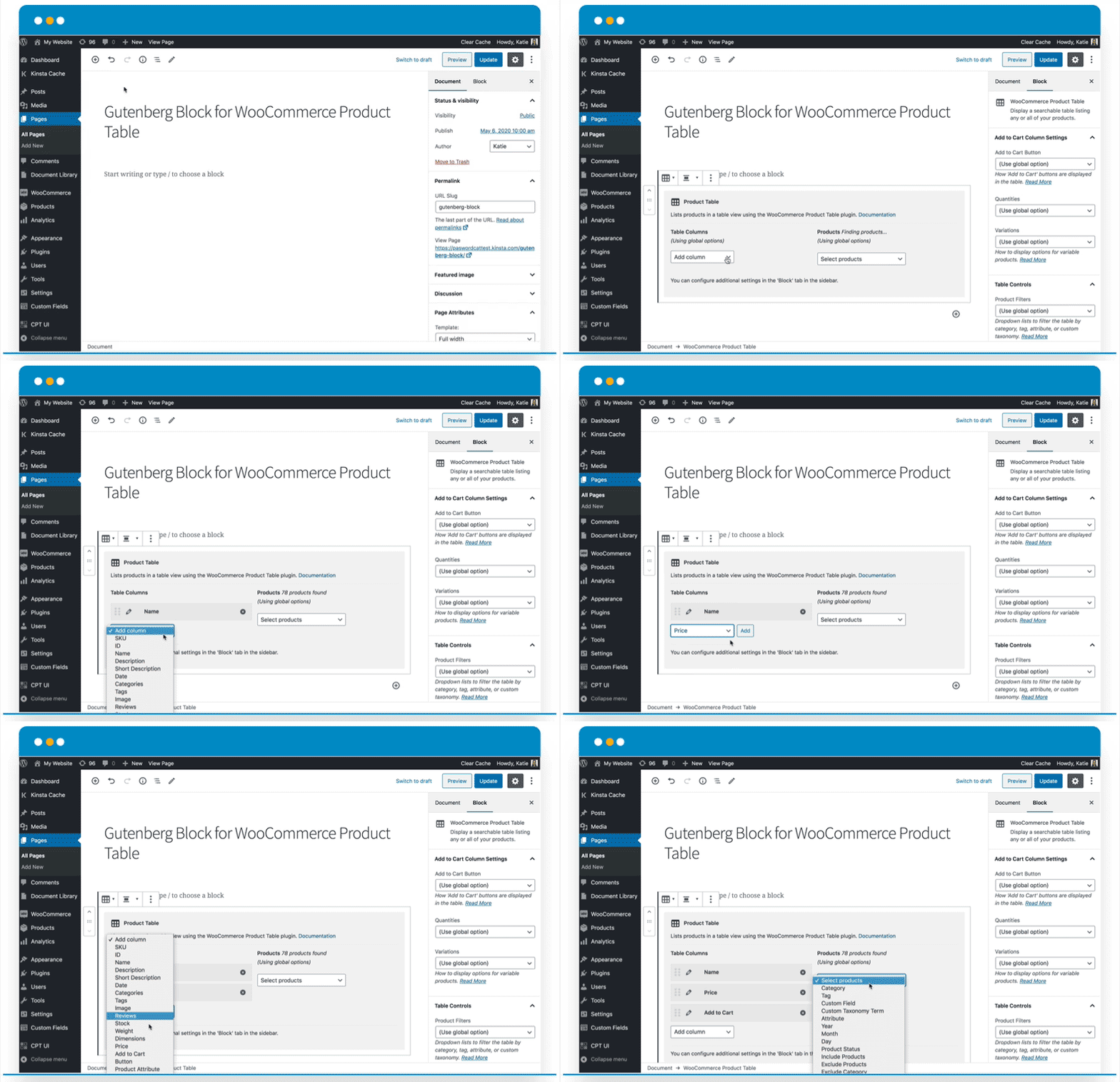
Adds a Gutenberg block for WooCommerce Product Table, allowing you to insert product tables anywhere!
Note: Since building this block plugin, we have added an interactive table builder to the main WooCommerce Product Table plugin. This makes it easy to create product tables and insert them into the block editor or any page builder. While you can still use the block plugin, it is no longer actively being developed and we recommend using the built-in table builder instead, which has more features.
Gutenberg Block for WooCommerce Product Table adds a user-friendly editor block to the WooCommerce Product Table plugin by Barn2, providing an easier way for Gutenberg users to create product tables. It requires WooCommerce Product Table (available separately) to work.
WooCommerce Product Table lists products in a quick order form layout designed to increase your sales and average order value. Instead of having to visit a separate page for each product, customers can select products, quantities and variations from the product table and quickly add them to the cart.
WooCommerce Product Table is highly flexible and you can choose which products to include, a wide range of column options, filters, instant AJAX search, add to cart button styles, and more.
Gutenberg Block for WooCommerce Product Table makes it easy to insert product tables anywhere on your site using the Gutenberg editor. This gives you full control over your product tables.
BLOCK OPTIONS
You can use the WooCommerce Product Table editor block to add as many product tables as you like. You can even add multiple tables to the same page.
By default, each product table will inherit the global options from the WooCommerce Product Table plugin settings page. You can override the following options for each individual block:
-
Select your product table columns:
- Choose from SKU, ID, product name, description, short description, date published, categories, tags, reviews/star rating, stock, weight, dimensions, price, add to cart, button, attribute, custom field, and custom taxonomy
- Change the order of columns
- Rename columns
-
Select which products to include in the table:
- List all products, or select specific products based on category, tag, custom field, custom taxonomy, attribute, year, month, day, status, ID, or list previously ordered products by the current user.
- Exclude specific products or categories.
-
Add to cart column settings:
- Add to cart button – choose from button, checkbox, or both.
- Quantity picker.
- Variations – display as dropdowns, list each variation on its own row of the table, or link to the single product page.
-
Product filters – Add filter dropdowns above the table so that customers can refine the list by category, tag, attribute, or custom taxonomy.
- Additional options – You can also use any of the other 50+ options that are available in the WooCommerce Product Table plugin.
HOW TO USE THE BLOCK
- First make sure WooCommerce, Gutenberg Block for WooCommerce Product Table and WooCommerce Product Table are all installed.
- Next, go to any page or post that uses the Block (Gutenberg) editor and click the + icon to add a new block.
- Navigate to the ‘WooCommerce’ section and find the block called ‘WooCommerce Product Table’, or type ‘WooCommerce Product Table’ into the search box. This will insert the WooCommerce Product Table block into the editor.
- By default, the block will list all your products and will inherit the global options from the WooCommerce Product Table plugin settings page. You can override these by setting options directly in the Gutenberg block:
- Table Columns – Use the ‘Add column’ dropdown to select which columns to include in the WooCommerce Product Table. You can re-order columns using drag and drop, and rename columns by clicking the pencil icon. Read more about the product table columns.
- Products – Use the ‘Select products’ dropdown to list specific products in the table. For example, you can select products by ID, category, tag, attribute, custom field value, custom taxonomy term, date, status, and more. There are also options to exclude products from the table based on category or ID. Read more about listing specific products.
- You will find additional block settings in the ‘Block’ tab of the Editor sidebar. Use these to configure the add to cart column of the table; add filter dropdowns above the table; and to use any of the additional options available in WooCommerce Product Table.
- Finally, update or Preview the page to view the product table on the front end of your website.
- Repeat steps 2-5 to add more product tables.


