
Block Editor Gallery Slider – Transform Galleries into Beautiful Sliders
by Krasen Slavov on WordPress.org
Transform your WordPress galleries into stunning, responsive sliders with lightbox preview. Supports Block Editor, Classic Editor, WooCommerce & C …
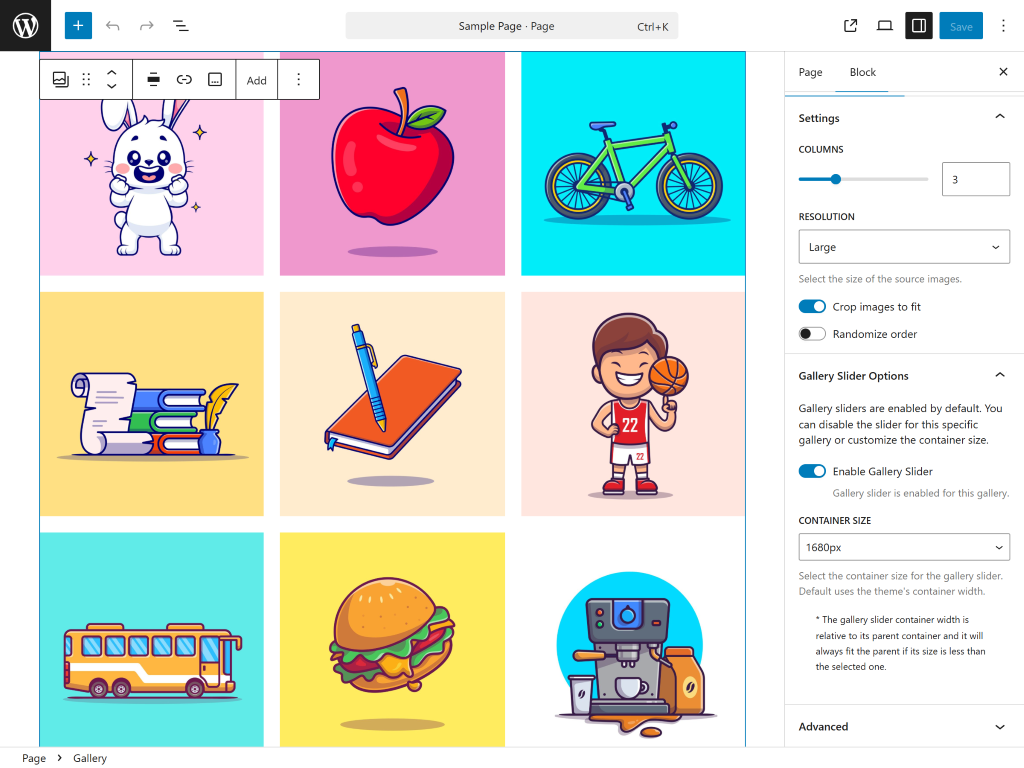
screenshot-1.(png)
Block Editor Gallery Slider is the ultimate solution for transforming your standard WordPress galleries into beautiful, interactive sliders with advanced lightbox functionality. Perfect for photographers, portfolios, e-commerce stores, and any website looking to showcase images professionally.
https://www.youtube.com/embed/
Why Choose Block Editor Gallery Slider?
- Zero Configuration Required – Works out of the box with sensible defaults
- Dual Editor Support – Seamlessly integrates with both Gutenberg Block Editor and Classic Editor
- WooCommerce Ready – Perfect for product galleries and e-commerce sites
- Responsive & Mobile-Friendly – Beautiful on all devices and screen sizes
- Lightweight & Fast – Optimized code ensures minimal impact on site performance
- Advanced Lightbox – Elegant image preview with prev/next navigation at 50% opacity
- Customizable Container Sizes – Choose from 540px to 1680px or full browser width
- Individual Gallery Control – Enable/disable slider per gallery in Block Editor
- Custom Post Types Support – Works with any registered custom post type
Perfect For
- Photographers showcasing portfolios
- E-commerce stores displaying product images
- Real estate websites with property galleries
- Travel blogs featuring destination photos
- Creative agencies presenting project work
- Wedding photographers sharing event galleries
- Art galleries exhibiting collections online
Key Features
Gallery Management
* Convert standard WordPress galleries into interactive sliders instantly
* Individual gallery control in Block Editor (enable/disable per gallery)
* Global control in Classic Editor (applies to all galleries on a page)
* Multiple container size options (540px, 720px, 960px, 1140px, 1320px, 1680px, full width)
* Responsive design adapts to parent container width
Advanced Lightbox
* Two lightbox modes: Advanced (with prev/next at 50% opacity) and Basic (single image view)
* Smooth transitions and animations
* Click outside to close
* Keyboard navigation support
* Touch-friendly for mobile devices
Flexible Controls
* Enable/disable sliders globally on front-end
* Control slider visibility by post type (Posts, Pages, WooCommerce Products, Custom Post Types)
* Choose which editors show slider controls (Block Editor, Classic Editor)
* Granular settings for maximum flexibility
Performance Optimized
* Conditional script loading (only loads when needed)
* Minified CSS and JavaScript
* Efficient code with minimal database queries
* No jQuery conflicts
User-Friendly Interface
* Intuitive onboarding notice for new users
* Clear, step-by-step setup instructions
* Visual preview in Block Editor
* Dedicated settings page under Settings > Block Editor Gallery
* Helpful “How It Works” documentation built-in
How It Works
For Block Editor Users:
1. Create or edit a post/page
2. Add a Gallery block
3. Upload your images
4. In the Gallery block settings panel, find “Gallery Slider Options”
5. Choose your desired container width
6. Publish and view your stunning slider!
For Classic Editor Users:
1. Create or edit a post/page
2. Add images using “Add Media” > “Create Gallery”
3. In the sidebar, find “Gallery Slider Options” metabox
4. Enable the slider and choose container width
5. The slider applies to ALL galleries on that page
6. Publish and enjoy!
Settings & Configuration
Navigate to Settings > Block Editor Gallery to configure:
- Front-End Sliders – Master on/off switch for all gallery sliders
- Editor Controls – Show/hide slider controls in Block Editor or Classic Editor
- Post Type Controls – Select which post types display slider functionality
- Lightbox Mode – Choose between Advanced or Basic lightbox display
Backward Compatibility
Fully supports WordPress versions back to 6.6, ensuring smooth upgrades and compatibility with various WordPress configurations.
Developer Friendly
- Clean, well-documented code following WordPress Coding Standards (WPCS)
- Object-oriented PHP architecture
- Extensible with WordPress hooks and filters
- Modular SCSS and JavaScript structure
- Easy to customize and extend
Translation Ready
- Fully internationalized and translation-ready
- .pot file included for easy translations
- RTL (Right-to-Left) language support
Privacy & Security
- No external API calls or data collection
- All processing happens on your server
- Follows WordPress security best practices
- Regular security updates and patches
- Nonce verification and capability checks throughout
Additional Information
Documentation
Comprehensive documentation, video tutorials, and live demos are available on our official website.
Support
- Community support via WordPress.org Forums
- Priority support available through our website
Contributing
Love the plugin? Here’s how you can help:
- Rate us 5 stars on WordPress.org
- Report bugs or suggest features
- Support development on Patreon
About the Developer
Created and maintained by Krasen Slavov – WordPress developer specializing in clean, performant plugins that enhance the WordPress experience.
Pro Version
Currently, this plugin does not have a premium version. All features are available for free! If you’d like to support ongoing development, consider becoming a patron.