
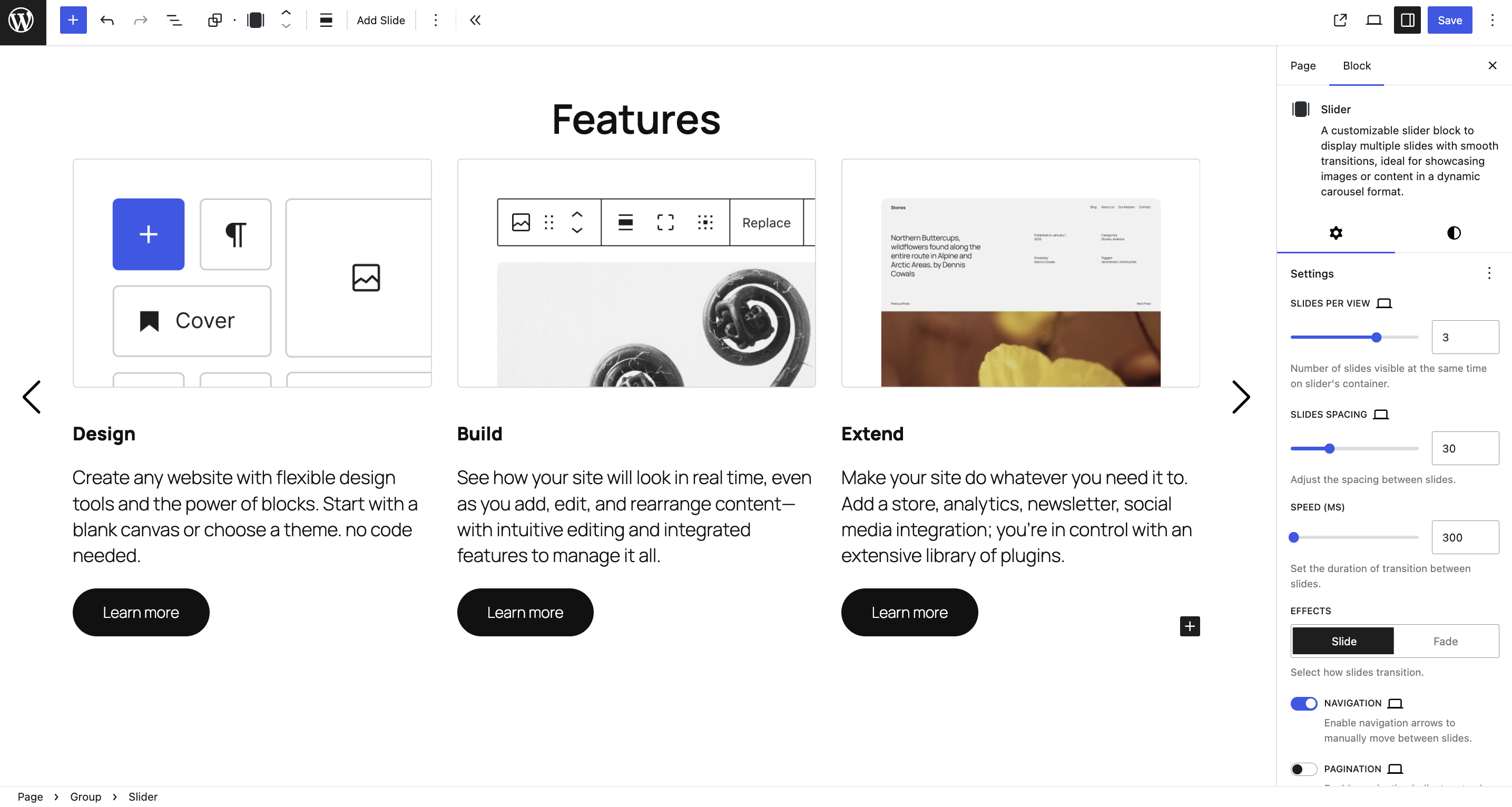
Block Editor Settings – Adjust your slider layout, animation, and navigation instantly.
Slider Block (part of the BlaBlaBlocks suite) is a WordPress plugin that lets you build responsive sliders, carousels, and Gutenberg sliders directly inside the Block Editor no shortcodes, no page builders, and no coding required.
This block gives you an intuitive, visual way to add sliders to your pages, posts, or full site editing templates. Choose from ready-to-use templates or start from scratch, fully customize slide layout, autoplay, and navigation all within the native WordPress interface.
Why Choose BlaBlaBlocks Slider Block?
- Accessible by Design – WCAG-compliant with ARIA roles, keyboard navigation, and screen-reader support.
- Responsive and Fluid – Automatically adapts to mobile, tablet, and desktop breakpoints.
- Gutenberg-Native Experience – Seamlessly integrated into the Block Editor.
- Query Loop Support – Turn WordPress posts into a dynamic carousel using the native Query Loop block.
- Template Library – Insert pre-built slider layouts: hero sections, testimonials, image carousels, and more.
- Server-Side Rendering – Ensures your editor preview always matches the frontend output.
- Lightweight and Fast – Minimal scripts, optimized rendering, and no frontend bloat.
Whether you’re creating a full-width hero slider, a small testimonial carousel, or a product showcase, the Slider Block makes it simple, accessible, and fast.
Key Features
Accessible Sliders
Every slider is fully accessible out of the box:
- Keyboard navigation for next/previous slides.
- ARIA labels and roles for assistive technologies.
- Screen reader-friendly transitions.
- Optional focus management for improved UX.
Responsive by Default
Your slider automatically scales to different viewports.
Adjust slides per view, spacing, and breakpoints — perfect for mobile-first sites.
Gutenberg Integration
Built entirely for the WordPress Block Editor, this plugin uses the latest React-based block architecture. You can:
- Drag and drop slides directly in the editor.
- Use nested blocks for advanced layouts.
- Adjust all options in the right sidebar no shortcodes or widgets.
Posts Carousel with Query Loop
Build dynamic carousels from your latest or filtered posts using the native Query Loop block. You can:
- Insert the Posts Carousel variation directly from the Slider block.
- Use WordPress query controls to choose post type, order, and posts per page.
- Customize the post template with core blocks like featured image, title, excerpt, date, and read more.
Pre-Made Templates
Skip the setup with built-in templates for:
- Hero sliders
- Image carousels
- Testimonials
- Content showcases
Each template is fully customizable just insert, edit, and publish.
Advanced Configuration
Fine-tune every detail:
- Slides per view
- Pagination and navigation controls
- Autoplay and speed settings
- Transition effects
- Direction (horizontal/vertical)
Lightweight and Optimized
Slider Block uses minimal JavaScript and CSS only loading assets when the block appears on the page. This ensures fast load times and top performance scores.
How to Create a Slider in Gutenberg
- Open the Block Editor (Gutenberg).
- Search for “Slider” to add the block.
- Insert the BlaBlaBlocks Slider Block.
- Add slides you can use images, headings, buttons, or any block inside each slide.
- Customize slider options in the sidebar panel (autoplay, speed, arrows, pagination).
- Save and preview your responsive slider is ready!
Check documentation more details.
How to Use Templates Library
- Click the “Template Library” button inside the slider block toolbar.
- Choose from multiple designs Hero, Testimonial, Carousel, Gallery.
- Customize slide content, layout, and animations instantly.
Check documentation more details.
Common Use Cases
- Homepage hero sliders with call-to-action buttons.
- Testimonial carousels on service pages.
- Logo sliders for brand showcases.
- Product image carousels in WooCommerce product pages.
- Featured content sliders on blogs or portfolios.
Technical Features
- Built with React + WordPress Block API.
- Uses Swiper.js.
- Supports dynamic slide content.
- Server-side rendering ensures perfect frontend/editor consistency.
- Fully compatible with WordPress 6.6+ and PHP 7.4+.
SEO and Performance
Slider Block follows best practices for:
- Semantic HTML output.
- Accessible ARIA structure for screen readers.
- Optimized DOM footprint for Core Web Vitals compliance.
Troubleshooting
The slider doesn’t autoplay:
Check the block settings and ensure “Autoplay” is toggled on. Autoplay is disabled by default for accessibility reasons.
Keyboard navigation not working:
If multiple sliders are on a single page, ensure you’re using version 1.1.0 or later (this fixes navigation conflicts).
Layout issues on mobile:
Try adjusting the “Slides per view” setting or resetting custom CSS if applied by your theme.
Integrations
- Works with WordPress Core Blocks (Image, Heading, Button, Group).
- Compatible with WooCommerce product blocks.
- Can be combined with block patterns and reusable blocks for advanced layouts.
Open Source and Contributions
The BlaBlaBlocks Slider Block is 100% open source.
You’re welcome to use, modify, or contribute improvements.
-
Source Code:
https://github.com/lubusIN/blablablocks-slider-block -
Report Issues:
https://github.com/lubusIN/blablablocks-slider-block/issues


