
Bitvolution Image Galleria
by Tom Fotherby on WordPress.org
This plugin replaces the default Wordpress gallery feature with a more fancy image gallery inspired by the "Galleria" JQuery Image gallery.
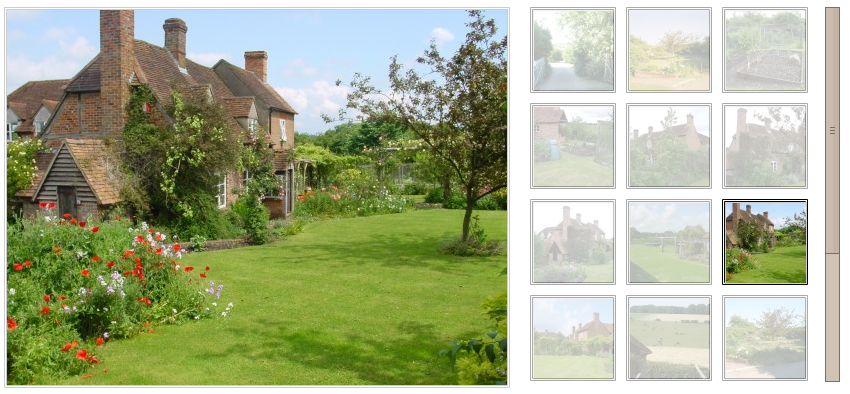
Image gallery with default style.
This plugin changes the way the in-built WordPress Gallery is displayed to the user. The WordPress author uploads images to their pages/posts as normal and uses the usual [gallery] shortcode to display the gallery but instead of the default WordPress image gallery with rows and columns of images, the user will be shown a more fancy image gallery inspired by the Galleria JQuery Image gallery.
This plugin is rather specific and custom – it has no configurable settings other than the default WordPress gallery options. It is designed so that once set up, it is invisible to the WordPress author – they will not need to learn or do anything different from normal WordPress gallery usage. Documentation for the WordPress gallery can be found at http://en.support.wordpress.com/images/gallery/.
In order to be efficient, the plugin uses the WordPress in-built image scaling feature – Whenever a WordPress author uploads a image, WordPress automatically creates 3 different sizes of the image (A thumbnail size, a Medium size and a Large size). In order to avoid wasteing bandwidth by scaling the image on the front-end, this plugin uses the “thumbnail” size and the “Medium” size images. The disadvantage of this is that the default WordPress image dimensions aren’t really suitable for Galleria and will need to be altered. See the plugin installation instructions for details.
Users should follow the Codex on using the [gallery] shortcode: https://codex.wordpress.org/Using_the_gallery_shortcode
Developers can learn more about the WordPress shortcode API: https://codex.wordpress.org/Shortcode_API
Current features:
- Displays one main ‘medium’ sized image and a grid of ‘thumbnail’ sized images
- Image captioning.
- Next/Previous links to cycle through the gallery
- User can click on main image to see ‘full-size’ version.
- Zero additional configuration options (plugin uses existing WordPress image options, i.e. image sizes)
- Efficient: No front-end image resizing via CSS
Current limitations:
- Doesn’t work “out of the box” on a default WordPress installation – requires a manual change of the default WordPress image sizes otherwise galleries aren’t formatted correctly – See installation instructions.
- By default the gallery requires a width of 850px or more – many themes have a smaller content width so the gallery will wrap onto seperate lines and won’t look at all good.
- No image pre-loading (nice for your server but not so snappy for your users).


