
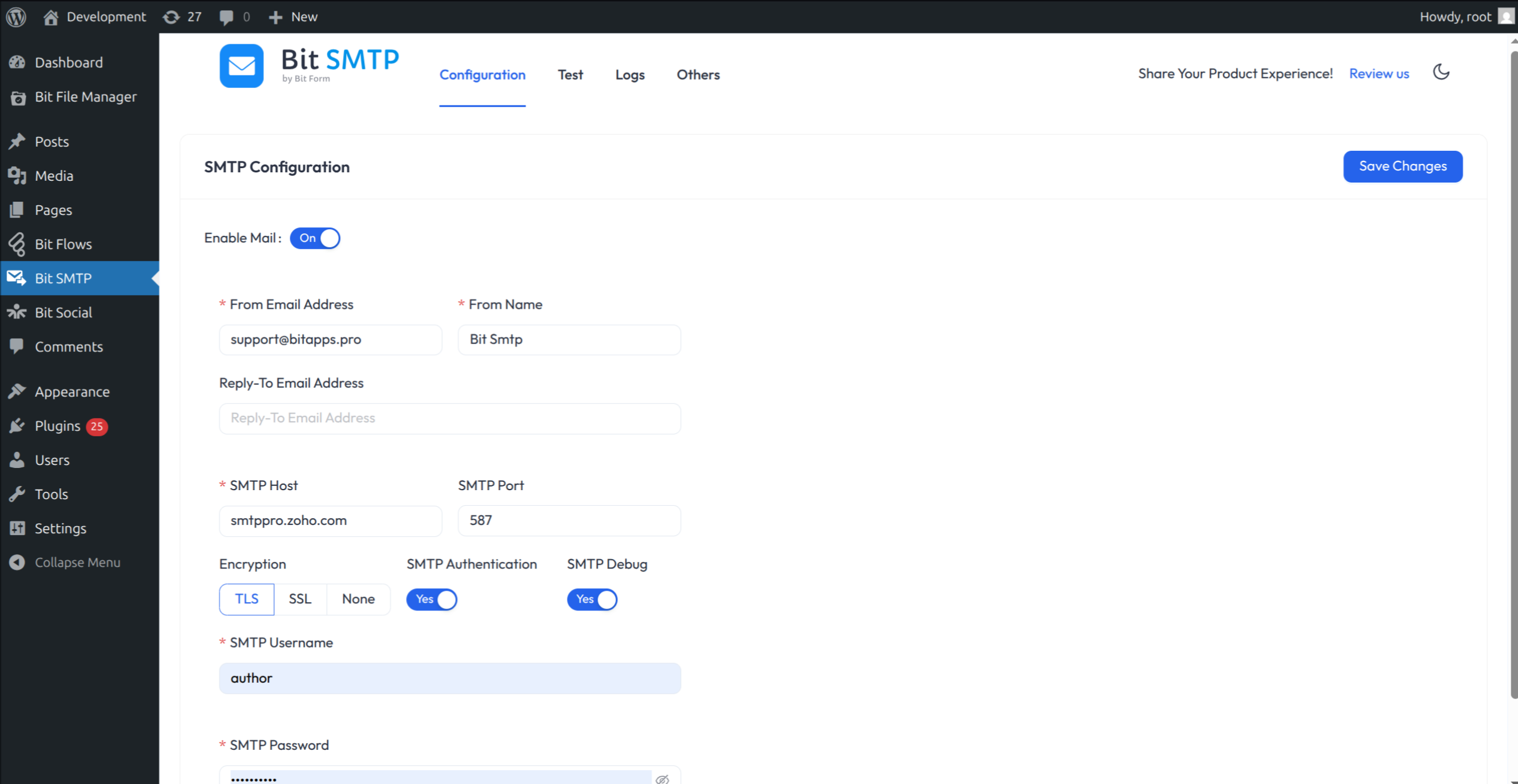
SMTP Configuration
Short Description
SMTP plugin for reliable and secure email delivery. Connect with Gmail, Outlook, Sendgrid, Brevo, MailGun, Amazon SES, and more mail SMTP servers.
SMTP Plugin for WordPress for Reliable and Secure Email Delivery | Complete Free SMTP Solution with Detailed Email Logs
Easily fix WordPress email delivery issues. Connect with Gmail SMTP, SendGrid, Amazon SES, Outlook, Mailgun, and more SMTP services to keep your site communication dependable and secure.
Is your WordPress not sending emails, or are they going to spam?
Solve your email delivery problems with Bit SMTP. The perfect WP Mail SMTP plugin. SMTP helps you send WordPress emails safely and reliably.
When you use Bit SMTP, your emails get delivered perfectly because they are sent from an authenticated source. Many WordPress sites have problems with email. The standard PHP mail function is often blocked or filtered as spam. Bit SMTP solves this issue. It lets you connect your WordPress site to any real SMTP server.
Easily track and manage all your WordPress email logs with Bit SMTP.
Bit SMTP is a free plugin. All of the features are completely free. So you don’t need to spend on SMTP configuration
Let’s explore the main reasons to use Bit SMTP and how you can set it up easily.
Easily Setup Mail SMTP in Minutes
Using an SMTP server authenticates your website’s emails, proving they are from a trusted source. This tells the recipient’s mail system that your email is genuine. It is like presenting your ID before entering a secure building.
Getting started with Bit SMTP is simple:
- Sign up with an email provider: Choose Gmail, Mailgun, Yahoo, Zoho Mail, or your favorite.
- Get your SMTP details: Your provider gives you the host, port, and encryption info.
- Add these details in Bit SMTP: Go to your WordPress dashboard. Add your SMTP details.
- Send a test email: Make sure emails go out. Now, every message uses a secure SMTP connection.
- Enable email logs: You will see detailed email logs from the Bit SMTP dashboard.
Your provider handles delivery, ensuring your WordPress emails arrive securely every time.
⚡Key Features of Bit SMTP ⚡
Bit SMTP gives you all the tools you need to send emails from WordPress safely and reliably.
- Connect to Any SMTP Server: Easily integrate with top SMTP Mail services like Gmail, Outlook, Amazon SES, SendGrid, Mailgun, and more.
- Secure Mail Delivery: Send emails with SSL/TLS encryption for secure transmission.
- Customizable Reply-To: Set a custom Reply-To address for managing responses.
- Quick Setup: Get started with simple setup steps and configure your emails within minutes.
- Free and Fully Functional: All features are completely free. No premium plan required
- Details Email Logs: You can view detailed logs of every email sent through your SMTP in the Bit SMTP dashboard. Set how long to keep the logs with a date range. You can also search logs by email address.
- Dark Mode Interface: Bit SMTP comes with a clean dark mode that’s easy on the eyes and makes your dashboard look great.
Simple Setup for SMTP Configuration in WordPress
Get Bit SMTP running in minutes. Just go to Bit SMTP ▸ Mail Configuration in your WordPress dashboard.
What to enter:
- Enable Mail: Select yes
- From Email Address: Set the sender’s email
- From Name: Name to show as sender
- Reply-To Email Address: Add if you want replies somewhere specific
- SMTP Host: The mail server, such as smtp.gmail.com for Gmail SMTP
- Type of Encryption: SSL or TLS, as recommended
- SMTP Port: Use the right port number (usually 465 or 587)
- SMTP Authentication: Yes, and then fill in your username and password
- Username and Password: Use details from your email provider
Once you save, Bit SMTP handles the rest. Now, WordPress Mail SMTP is in action, and your emails are safer.
Supported Email Services and SMTP Providers
Bit SMTP is designed to work with almost all popular SMTP providers. You can connect your site to these SMTP mail services. Most of the SMTP providers offer free plans. This flexibility allows you to choose the best option for your needs and budget.
Here is a list of popular providers and their SMTP settings:
Mailgun SMTP
Get 100 free emails per day.
- Host: smtp.mailgun.org
- Encryption: TLS
- Port: 587
Gmail SMTP
Easy for bloggers and small businesses. Use a Gmail or Google Workspace account for WordPress emails.
- Host: smtp.gmail.com
- Encryption: TLS
- Port: 587
Hotmail SMTP
Works for Hotmail or Outlook.com accounts. Use Microsoft’s server for your mail.
- Host: smtp.live.com
- Encryption: TLS
- Port: 587
Yahoo SMTP
Set up outgoing mail from your Yahoo account.
- Host: smtp.mail.yahoo.com
- Encryption: SSL
- Port: 465
Zoho Mail SMTP
Reliable for secure email delivery.
- Host: smtp.zoho.com
- Encryption: TLS
- Port: 587
Amazon SES SMTP
Best choice for sending large numbers of emails.
- Host: email-smtp.us-west-2.amazonaws.com
- Encryption: TLS
- Port: 587
SendGrid SMTP
Get 100 free emails a day. SendGrid is well-known for great deliverability.
- Host: smtp.sendgrid.net
- Encryption: TLS
- Port: 587
Brevo (Sendinblue) SMTP
Send up to 300 free emails each day with Brevo.
- Host: smtp-relay.sendinblue.com
- Encryption: TLS
- Port: 587
Outlook SMTP
Send business emails with Microsoft 365 or Outlook.com accounts.
- Host: smtp-mail.outlook.com
- Encryption: TLS
- Port: 587
Test Your SMTP Connection
Bit SMTP includes a tool for this:
- Visit Bit SMTP ▸ Testing in your site dashboard.
- Add the recipient’s address, your subject, and a brief message.
- Click “Send Test”.
If you receive the email, you’re setup is correct. To make things even easier, check out our video tutorial:
Compatible with All the Top Form Plugins
If you use forms, you want to make sure notifications are delivered every time. Bit SMTP works with all leading form plugins on WordPress.
Supported plugins include:
- Bit Form
- Gravity Form
- Contact Form 7
- WPForms Pro
- Ninja Forms
- Forminator Forms
- Fluent Forms
- Formidable Forms
- Everest Forms
- WS Forms
- Happy Forms
- weForms
- Kali Forms
- WPForm Lite
- PlanSo Forms
- Form Maker by 10Web
- Elementor Form
- FormCraft
- Quform WordPress Form Builder
- Caldera Contact Forms
And all other plugins that rely on WordPress’s wp_mail to send emails
Strong Security for Your WordPress Emails
Bit SMTP follows best security practices. Many providers, like Gmail SMTP, SendGrid, or Mailgun, provide secure SMTP configuration credentials. You can connect using the SMTP credentials, not by typing your main login into WordPress. This keeps your data safe and ensures a higher level of security.
**Reliable WordPress Mail SMTP for Every User**
Don’t let emails go missing or end up in spam. Bit SMTP, the leading WP Mail SMTP plugin, gives you full control over your WordPress email delivery. You can use Gmail SMTP or connect to any mail service you trust.
Make sure all your emails get to the right place, every time. Install Bit SMTP now and enjoy reliable, secure email delivery from your WordPress site. Say goodbye to missed emails and spam issues!
Track and Monitor WordPress Email Logs
With Bit SMTP’s built-in email logs system, you can easily track every email you send. View delivery details and monitor performance right from your WordPress dashboard. This gives you complete transparency and control over your WordPress site’s email activity.
Explore Our Other Products :
- Bit Form: A powerful WordPress form builder that lets you create multi-step and conversational forms with a smart drag-and-drop builder. Connect your forms with 50+ apps through built-in integrations to automate workflows. Build, customize, and convert with the lightning-fast form solution
- Bit Integrations: A no-code WordPress automation plugin that lets you connect 300+ apps and services to automate your workflows in minutes. With its 3 easy automation methods, you can automate tasks, sync data, and maximize productivity. It connects your forms, CRMs, LMS, and eCommerce tools all inside WordPress.
- Bit Assist: Connect all your customer support channels with a single button. Integrate Floating Chat Widget, WhatsApp, Email, SMS, Telegram, Messenger, and more with Bit Assist.
- Bit Social: A social media automation tool that lets you auto-post, schedule, and share instantly across 12+ platforms like Facebook, Instagram, LinkedIn, X, Pinterest, and more with a smart calendar view.
- Bit Flows: Bit Flows is a powerful automation tool with multi-step, unlimited workflows and advanced tools, including Router, Repeater, Iterator, and JSON Parser. With built-in AI integrations, it’s a more powerful and easier alternative to n8n.
- Bit File Manager: Bit File Manager is a WordPress plugin for easy file management. Upload, organize, and control from your WordPress dashboard.
Join our Bit Apps Community for the latest plugin and exclusive features updates
You can find the full source code on GitHub, and we welcome any contributions to help improve this amazing plugin
Telemetry Data
Bit SMTP uses wp-telemetry to collect some telemetry data upon the user’s confirmation. This helps us to troubleshoot problems faster & make product improvements.
Wp-Telemetry DOES NOT IMMEDIATELY start gathering data; rather, it will gather basic telemetry data when a user allows it. We collect the data to ensure a great user experience for all our users.