
BeepMate – Forms to your messaging app
by beepmateio on WordPress.org
Automatically send WordPress form submissions to WhatsApp instead of or alongside emails. Get instant notifications and respond to inquiries quickly.
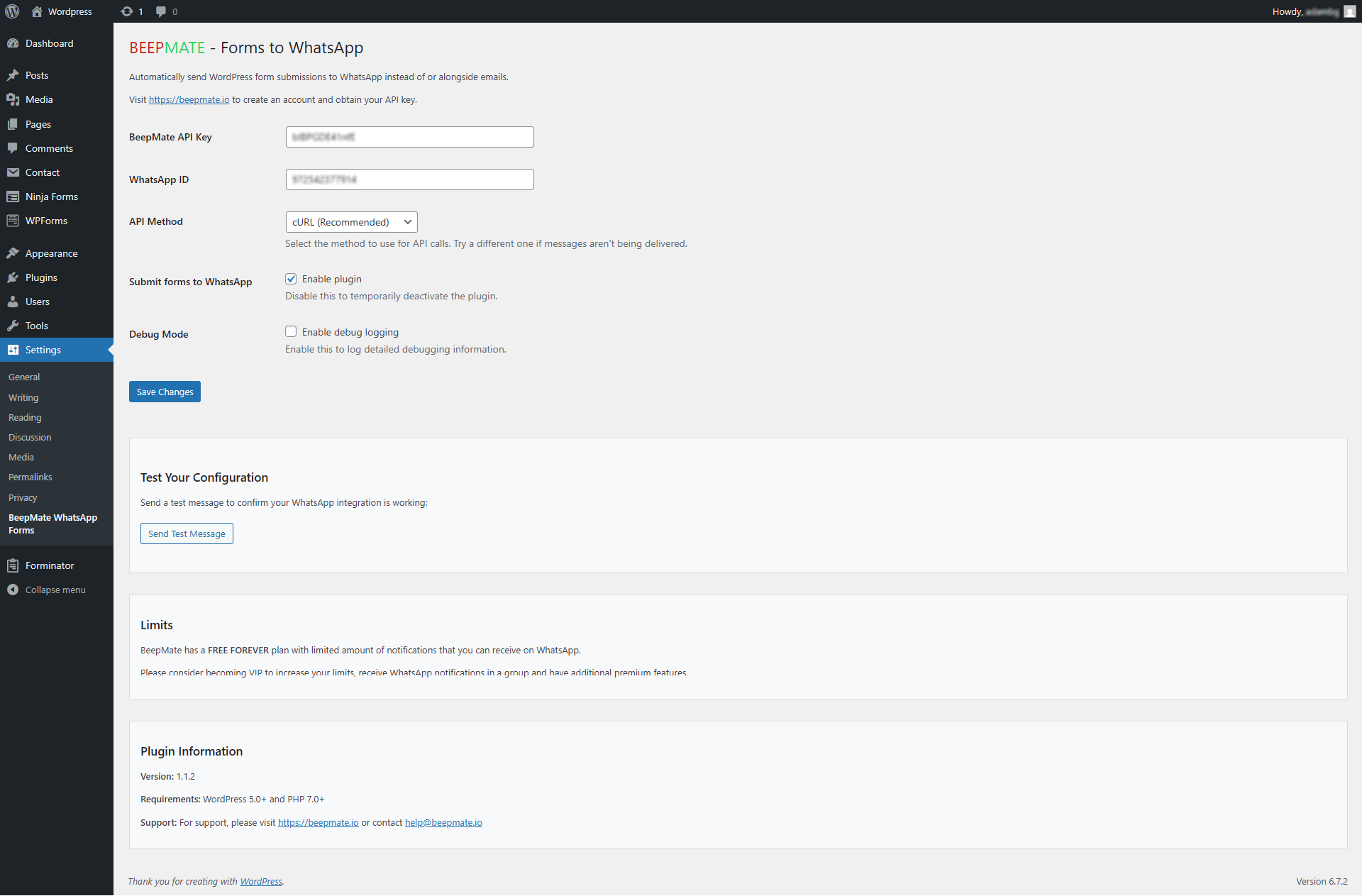
Plugin settings page.
BeepMate connects your WordPress site’s forms directly to WhatsApp. Whenever a visitor submits a form on your website, you’ll receive an instant WhatsApp message with their information.
Key Benefits
- Instant Notifications: Get form submissions delivered to your WhatsApp in real-time
- Better Response Times: Reply to inquiries directly from your phone, wherever you are
- Works With Any Form: Compatible with all WordPress form plugins that use the mail system
- No Complex Setup: Works automatically with your existing forms
- Attachment Support: Receives files submitted through forms
How It Works
The plugin integrates with WordPress’s email system to capture form submissions and redirect them to WhatsApp using the BeepMate API. It works alongside your existing email notifications, ensuring you never miss an important message.
You do not need to configure SMTP or any mailer settings (unless you want to) – it works even without a mailer.
Features
- Works with all WordPress form plugins (Contact Form 7, Gravity Forms, WPForms, Ninja Forms, Forminator etc.)
- Simple configuration with your BeepMate API key
- Multiple API connection methods for compatibility with all hosting environments
- Preserves special characters and emoji
- Debug mode for troubleshooting
- Maintains your existing email workflow
External services
This plugin connects to BeepMate API (beepmate.io) to send form submission data to WhatsApp.
It sends form submissions including text content and any attachments to the BeepMate service whenever a form is submitted on your site.
This service is provided by BeepMate: Privacy Policy.
Requirements
- WordPress 5.0 or higher
- PHP 7.0 or higher
- A BeepMate account (get your FREE account and FREE API key at beepmate.io)
- A WhatsApp account
External services
This plugin connects to BeepMate API (beepmate.io) to send form submission data to WhatsApp.
It sends form submissions including text content and any attachments to the BeepMate service whenever a form is submitted on your site.
This service is provided by BeepMate: Privacy Policy.
Technical Details
How It Works Technically
BeepMate intercepts WordPress emails at the PHPMailer level, right before they’re sent. When a form is submitted:
- The plugin hooks into
phpmailer_initto capture the email content - It extracts the recipient, subject, message body, and any attachments
- The information is formatted for WhatsApp
- The plugin connects to the BeepMate API using one of two methods (wp_removew or file_get_contents)
- The message is delivered to your configured WhatsApp number
All of this happens without modifying your existing forms or email system.
Configuration Options
BeepMate API Key: Your unique API key from BeepMate that authorizes the connection.
User ID: The phone number (with country code, no spaces or symbols) that will receive the WhatsApp messages.
Redirect All Forms: When set to “Yes,” all form submissions will be sent to WhatsApp. When “No,” the plugin remains inactive.
API Method: The technical approach used to connect to the BeepMate API:
– wp_remote: The recommended method, works on most servers.
– file_get_contents: An alternative if wp_remote is disabled on your server.
Debug Mode: Enables detailed logging for troubleshooting.
Debugging
If you’re experiencing issues with the plugin, you can enable Debug Mode in the settings. This will log detailed information about:
– Form interceptions
– Message preparation
– API calls
– Response codes and errors
Logs can be found in your WordPress debug log (if WP_DEBUG is enabled) or in your server’s PHP error log.
API Structure
The plugin uses BeepMate’s API with the following structure:
– For text-only messages: https://beepmate.io/send?key=YOUR_KEY&id=YOUR_ID&msg=MESSAGE
– For messages with attachments: A POST request to https://beepmate.io/send with multipart/form-data
Security Considerations
The plugin:
– Sanitizes all user input
– Uses WordPress nonces for form submissions
– Checks user capabilities before allowing settings changes
– Hides the API key in logs
– Properly escapes all output
Extending the Plugin
Developers can hook into the plugin’s functionality using these functions:
– beepmate_whatsapp_forms_prepare_message: Formats message content for WhatsApp
– beepmate_whatsapp_forms_send_to_beepmate: Handles the API connection
– beepmate_whatsapp_forms_debug: Controls debug logging
Known Limitations
- Currently supports sending to a single WhatsApp number
- Depends on the standard WordPress email system being used by forms
- Some form plugins that implement custom email sending may not be compatible