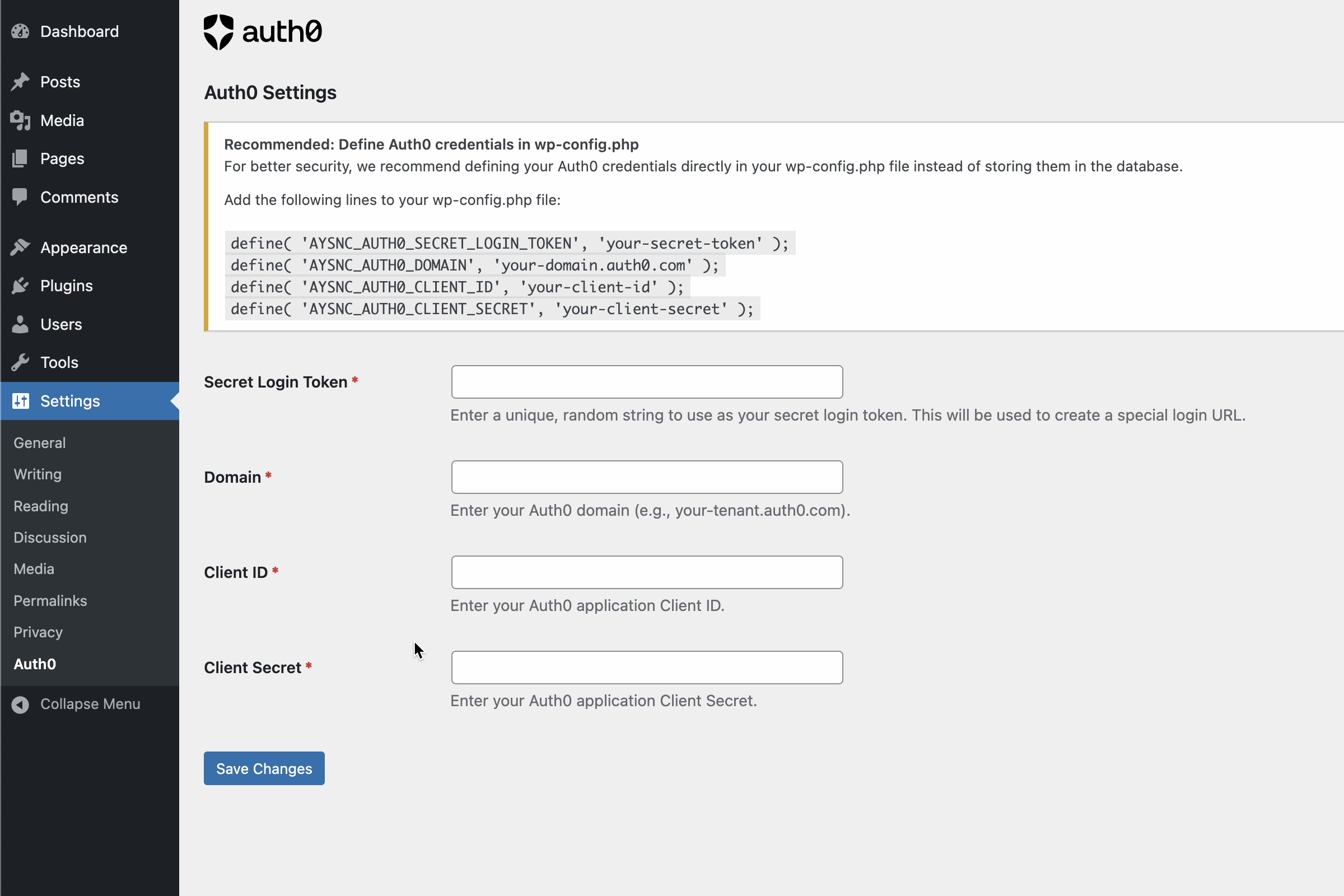
WordPress Admin Settings
Auth0 Login for WordPress provides a simple, secure way to log in to WordPress using Auth0. It hides the default login screen with a redirect to Auth0.
Watch this video to see how to configure your Auth0 application and hook it up to WordPress:
Features
- Very easy to set up
- Replaces the standard WordPress login URL with a secret link for additional security
- Authenticates users via Auth0 using OAuth 2.0 / OIDC
Configuration
You can configure the plugin either through the WordPress admin interface or by defining constants in your wp-config.php file (recommended for enhanced security).
Option 1: WordPress Admin Configuration (Basic)
- Go to WordPress Admin > Settings > Auth0
- Enter the following required information:
- Secret Login Token: A unique, random string that will be used for your custom login URL
- Domain: Your Auth0 domain (e.g., your-tenant.auth0.com)
- Client ID: Your Auth0 application Client ID
- Client Secret: Your Auth0 application Client Secret
- Save changes
Option 2: wp-config.php Configuration (Recommended)
For enhanced security, add the following lines to your wp-config.php file:
// Auth0 Configuration
define( 'AYSNC_AUTH0_SECRET_LOGIN_TOKEN', 'your-secret-token' );
define( 'AYSNC_AUTH0_DOMAIN', 'your-tenant.auth0.com' );
define( 'AYSNC_AUTH0_CLIENT_ID', 'your-client-id' );
define( 'AYSNC_AUTH0_CLIENT_SECRET', 'your-client-secret' );
This method prevents your Auth0 credentials from being stored in the database.
Important: Don’t lose your login URL!
After configuring the plugin:
- Your WordPress login URL will change to: https://your-wordpress-site.com/your-secret-token
- The standard wp-login.php page will be disabled
- Save your new login URL in a secure location – you’ll need it to access your WordPress admin area
If you change your Secret Login Token in wp-config.php, use the “Update Login URL” button in the Auth0 settings page to refresh the login URL.
External Services
This plugin connects to Auth0, a third-party authentication service, to provide secure user authentication for your WordPress site.
What is Auth0 and what is it used for?
Auth0 is a cloud-based identity and access management platform that provides authentication and authorization services. This plugin uses Auth0 to authenticate users instead of using WordPress’s built-in authentication system.
What data is sent and when?
The following data is transmitted to Auth0:
* When a user attempts to log in: The user is redirected to Auth0’s servers for authentication
* During the OAuth flow: Auth0 receives user credentials and returns authentication tokens and user profile information (email, name, etc.) back to your WordPress site
* User profile information such as email address is retrieved from Auth0 to match or create WordPress user accounts
Service Information
Service Provider: Auth0, Inc.
Service Website: https://auth0.com/
Terms of Service: https://auth0.com/terms
Privacy Policy: https://auth0.com/privacy
Important: You must configure your own Auth0 application and are responsible for reviewing and complying with Auth0’s terms of service and privacy policy. The data processing depends on your Auth0 configuration and the information users provide during authentication.