
Authica
by Emil Simunovic on WordPress.org
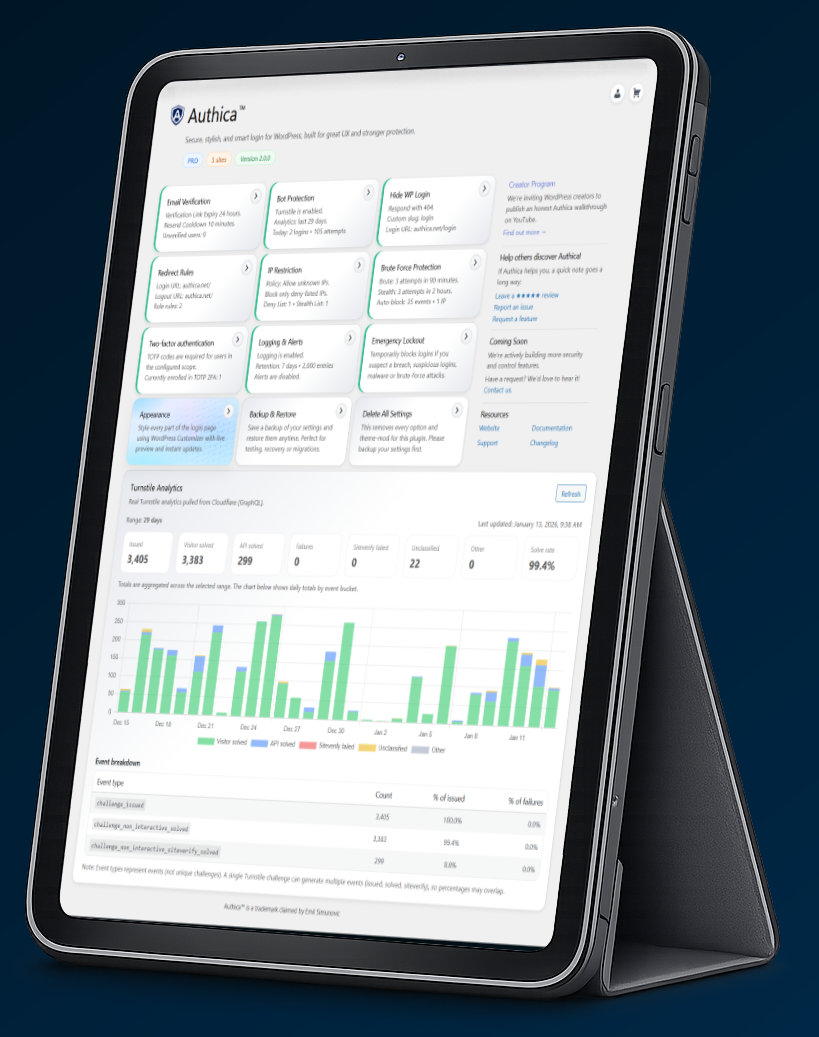
Authica™ upgrades the default WordPress login into a polished, on-brand experience with practical, layered security. It is built for agencies, developers, and site owners who want professional design control without sacrificing protection.
Creator Program: We invite WordPress creators to publish an honest Authica walkthrough on YouTube (no positive review required).
Find out more: authica.net/creator-program
Highlights:
-
Customizer Login Design
Brand every key element: logo, background, overlays, layout, and typography (including Google Fonts). -
Email Verification
Require users to confirm their email address before they can sign in. -
Bot Protection
Supports privacy-focused Cloudflare Turnstile. -
Hide / Rename wp-login.php
Reduce automated attacks by moving the login URL away from the default target. -
Login & Logout Redirects
Send users to the right page after login/logout (dashboard, custom URL, or role-based flows). -
IP Restriction
Allow/deny access to the login screen using IP rules. -
Brute Force Protection
Automatically rate-limit and block repeated failed login attempts. -
Two-Factor Authentication (TOTP)
Add app-based 2FA for stronger account security. -
Security Logs & Alerts
Monitor login activity and suspicious events from a single place. -
Social Login
Coming soon.
Authica Free includes full visual branding tools plus core security features. Upgrade to Authica Pro for advanced controls and premium protections.
Learn more: https://authica.net
Contributors
emilsim (Emil Simunovic)
Privacy
This plugin uses an optional opt-in to collect non-sensitive diagnostic data and plugin usage information to help improve the product. The opt-in is presented on first use and can be changed at any time under Authica Account.
Collected data may include: WordPress/site version, language, plugin/theme list and versions, admin email (for license/updates), and anonymized site URL. No personal content or passwords are collected.
Data is processed by our licensing/telemetry provider and by us for support and update delivery.
• Provider’s Privacy & Terms: https://freemius.com/privacy/ , https://freemius.com/terms/
If you choose not to opt in, only the information required to deliver updates to your site is stored (license/installation ID, if you activate a license).
Current Features
Branding & Design
– Upload your own logo
– Customize colors, backgrounds, and overlays
– Google Fonts
– Live preview via WordPress Customizer
Security & Protection
– Cloudflare Turnstile CAPTCHA integration
– Email verification (Pro)
– Hide/Rename wp-login.php (Pro)
– Redirect Rules
User Experience
– Custom welcome/error messages
– Login & logout redirects
– AJAX-powered login form
– Mobile-first responsive design
External services
Cloudflare Turnstile (human verification)
This plugin can integrate with Cloudflare Turnstile to protect login, registration, and password-reset forms from automated abuse.
• What is it used for?
Turnstile provides a human verification widget to reduce bot signups and credential-stuffing attempts.
• What data is sent and when?
– On pages where the widget is shown, the Turnstile JavaScript file is loaded from
https://challenges.cloudflare.com/turnstile/v0/api.js. When loaded, Cloudflare
may receive standard browser/connection data (e.g., IP address, user agent, referrer)
and evaluate device/browser signals to determine risk, per Cloudflare’s documentation.
– When a verification token is produced by the widget, your WordPress site makes a
server-to-server request to:
https://challenges.cloudflare.com/turnstile/v0/siteverify
The server-to-server verification includes the user’s response token and your secret key.
When a valid client IP is available, the optional remoteip value may also be sent to Cloudflare to improve verification accuracy.
• Where can I learn more?
– Cloudflare Turnstile: https://www.cloudflare.com/products/turnstile/
– Turnstile docs: https://developers.cloudflare.com/turnstile/
– Cloudflare Privacy Policy: https://www.cloudflare.com/privacypolicy/
– Cloudflare Terms of Service: https://www.cloudflare.com/terms/
• How do I disable it?
Turnstile integrations can be disabled at Authica Bot Protection, which stops the
widget from loading and the verification endpoint from being called.
jsDelivr (Chart.js fallback, admin-only)
For the admin “Captcha Statistics” chart, this plugin prefers a local copy of Chart.js
(bundled in assets/vendor/chart.js/). If the local file is not present, it falls back to
loading Chart.js from:
https://cdn.jsdelivr.net/npm/chart.js@4.4.3/dist/chart.umd.min.js
• What data is sent?
Only the administrator’s browser requests the static script file from the CDN.
No user content or personal data is transmitted by this plugin as part of that request.
• How do I avoid the CDN?
Keep the local file at assets/vendor/chart.js/chart.umd.min.js so the fallback is not used.
Email delivery
This plugin uses WordPress wp_mail() to send email verification messages. Mail delivery
is handled by your hosting provider or any SMTP/email plugin you configure. If you connect
a third-party email service (e.g., via an SMTP plugin), that service’s privacy terms apply.
This plugin does not send verification data to any email vendor on its own.
Trademark
Authica™ is a trademark claimed by Emil Simunovic. Registration pending.
WordPress is a registered trademark of the WordPress Foundation, used under license.