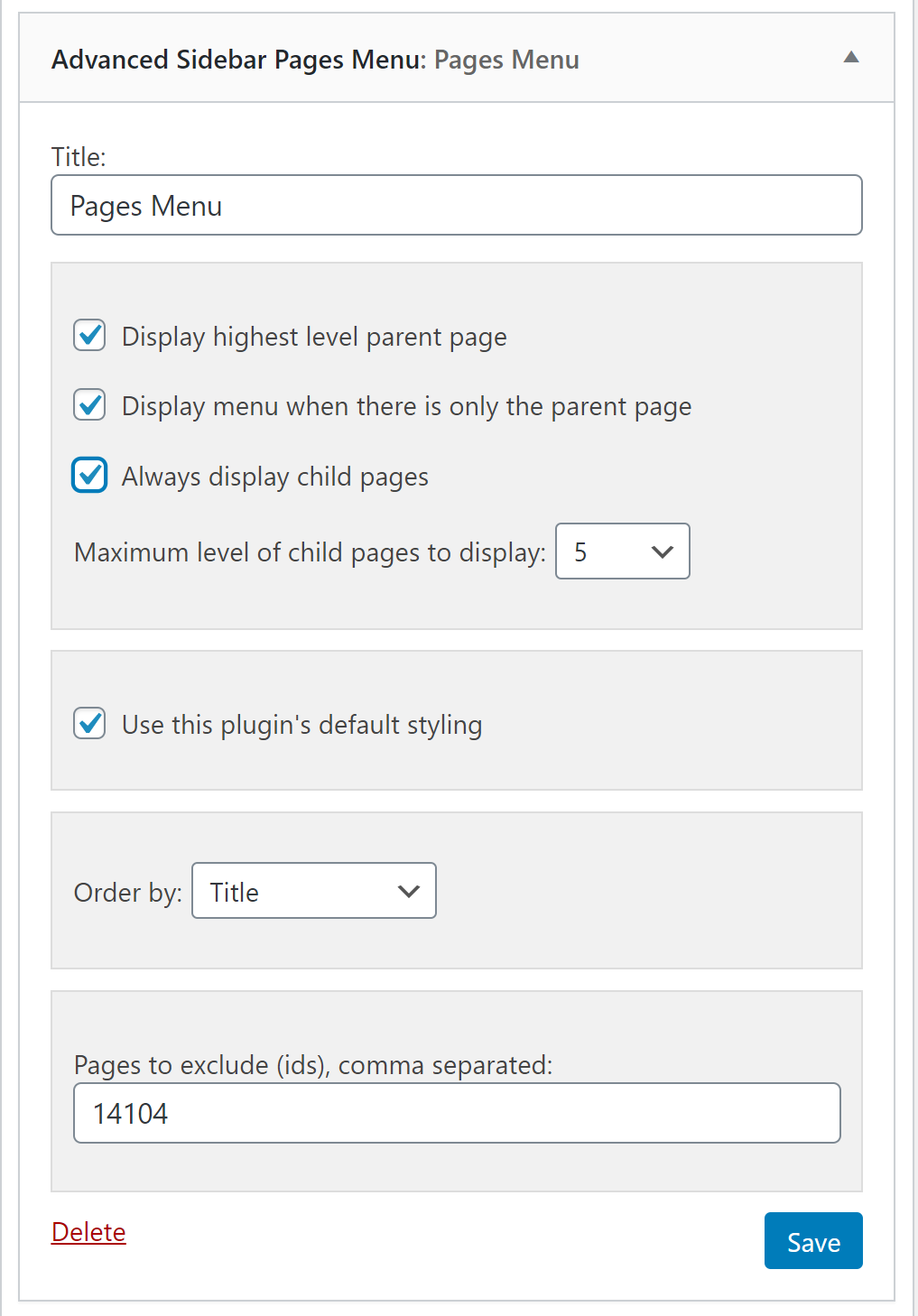
Page widget options.
Fully automatic sidebar menus.
Uses the parent/child relationship of your pages or categories to generate menus based on the current section of your site. Assign a page or category to a parent and Advanced Sidebar Menu will do the rest for you.
Keeps the menu clean and usable. Only related items display, so you don’t have to worry about keeping a custom menu up to date or displaying links to items that don’t belong.
Blocks are available to display menus where you need them. Look for the “Advanced Sidebar – Pages” block, or the “Advanced Sidebar – Categories” block. Widgets are also available for page builders or sites using classic widgets.
Developed and Supported by OnPoint Plugins.
Documentation
The official documentation for the plugin may be found here.
Demo
An interactive demonstration of the generated menu structure may be found here.
You may also use the Live Preview to use a playground site to test the plugin.
How It Works
When your users view a page or category, the Advanced Sidebar Menu plugin will calculate the related content based on what you have selected using the standard WordPress parent selectors.
The menu will be different for every page that displays the Advanced Sidebar Blocks because the menu is generated specifically to the current page.
Depending on “Pages” block options, the menu will display:
- The current page.
- Parent page.
- Child pages.
- Grandparent pages.
- Grandchild pages.
- First level child pages related to the current item.
Depending on “Categories” block options, the menu will display:
- The current category.
- Parent category.
- Child categories.
- Grandparent categories.
- Grandchild categories.
- First level child categories related to the current item.
Menu Locations
Blocks may be added to:
- Page/post content.
- Widget areas.
- Theme customizer.
- Site Editor.
- Really anywhere blocks are supported.
Classic widgets are also available for areas like:
- Elementor.
- Beaver Builder.
- Sites that have classic widgets enabled.
Features
- Page and Category menu Gutenberg blocks.
- Page and Category menu widgets.
- Option to display or not display the highest level parent page or category.
- Option to display the menu when there is only the highest level parent.
- Ability to order pages by (date, title, page order).
- Exclude pages or categories by entering a comma separated list of ids.
- Option to always display child pages or categories.
- Option to select the levels of pages or categories to display when always display child is used.
- Option to display or not display categories on single posts.
- Ability to display each single post’s category in a new widget/block or in same list.
Page Menu Options
- Display the highest level parent page.
- Display menu when there is only the parent page.
- Order pages by (date, title, page order).
- Exclude pages.
- Always display child Pages.
- Levels of child pages to display when always display child pages is checked.
Category Menu Options
- Display the highest level parent category.
- Display menu when there is only the parent category.
- Display categories on single posts.
- Display each single post’s category in a new widget/block or in same list.
- Exclude categories.
- Always display child categories.
- Levels of Categories to display when always display child categories is checked.
Included Language Translations
- English (en_US).
- French (fr_FR).
- German (de_DE).
- Spanish (es_ES).
Developers
Developer docs may be found here.
Contribute
Send pull requests via GitHub Repo
Go PRO
Our PRO version brings additional functionality to this plugin. Check out the demo to see if the PRO version is useful for you.
- Navigation menu widget.
- Navigation menu Gutenberg block.
- Ability to customize each page or navigation menu item link’s text.
- Click-and-drag styling for page, category, and navigation menus.
- Styling options for links including color, background color, size, hover, and font weight.
- Styling options for different levels of links.
- Styling options for the current page or category.
- Styling options for the parent of the current page or category.
- Blocked styling options including borders, border width, and border colors.
- Option to choose from 7 bullet styles or no bullets.
- Accordion menu support for pages, categories, and navigation menus.
- Accordion icon style and color selection.
- Accordion option to keep all sections closed until clicked.
- Accordion option to include highest level parent in accordion.
- Accordion option to use links for open/close.
- Ability to exclude a page from all menus using a simple checkbox.
- Link ordering for the category menus.
- Number of levels of pages to show when “always display child pages” is not checked.
- Ability to select and display custom post types.
- Ability to select and display custom taxonomies.
- Ability to display category post counts.
- Exclude pages or categories using intuitive search and select. NEW
- Option to display only the current page’s parents, grandparents, and children.
- Option to display child page siblings when on a child page (with or without grandchildren available).
- Ability to display the menu everywhere the widget area is used (including homepage if applicable).
- Ability to select the highest level parent page/category.
- Ability to select which levels of categories assigned posts will display under.
- Ability to display assigned posts or custom post types under categories or taxonomies.
- Ability to limit the number of posts or custom post types to display under categories.
- Support for custom navigation menus from Appearance -> Menus.
- Ability to display the current navigation menu item’s parents and children only.
- Option to display the top-level navigation menu items when there are no child items or not viewing a menu item.
- Priority support with access to members only support area.