Advanced Posts Blocks
by Toro_Unit (Hiroshi Urabe) on WordPress.org
Create Blocks filtered by any post type and any categories, tags or custom taxonomy terms.
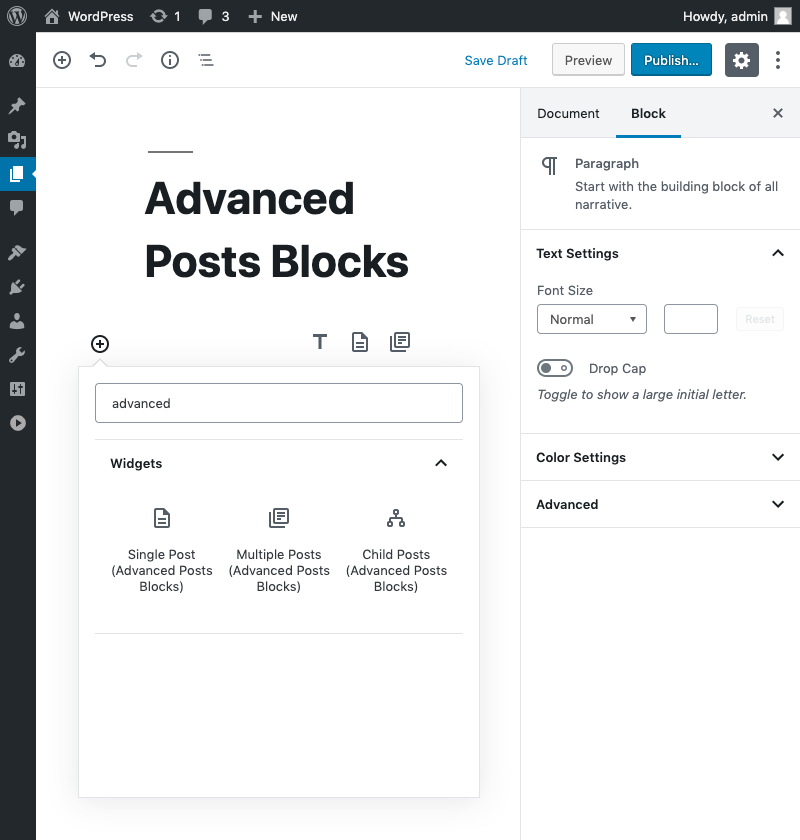
Blocks
Add Custom Dynamic Blocks for Render Post and Posts.
Multiple Posts Block
Displays a list of posts.
Posts Block filtered post type. (ex. post, page) and filter posts by multiple categories, tags or custom taxonomy terms.
Override template by your theme. if template-parts/blocks/advanced-posts-blocks/posts.php exists in your theme, replace default view.
Single Post Block
Displays the selected page or single post.
Override template by your theme. if template-parts/blocks/advanced-posts-blocks/post.php exists in your theme, replace default view.
Child Posts Block
Displays the child posts on the selected page or post.
Override template by your theme. if template-parts/blocks/advanced-posts-blocks/children.php exists in your theme, replace default view.
Override Template
Support template hierarchy. The templates are searched in the following order.
template-parts/blocks/advanced-posts-blocks/{Block_Type}/{Post_Type}-{Style}.phptemplate-parts/blocks/advanced-posts-blocks/{Block_Type}/{Post_Type}.phptemplate-parts/blocks/advanced-posts-blocks/{Block_Type}-{Style}.php-
template-parts/blocks/advanced-posts-blocks/{Block_Type}.php{Block_Type} is posts, post or children.
Template variables
$class_name(string) Block style class names.$query(WP_Query) Query for block.
5.2.0
- Use block.json api version 3.
- fix
attributesparameter toadvanced_posts_blocks_posts_queryfilter.
5.1.0
- Tested on WP 6.2 and PHP 8.2.
- add
attributesparameter toadvanced_posts_blocks_posts_queryfilter.
5.0.0
- Change icons.
- Refactor code.
- Tested WP 6.0.
- Use SSR only for Preview.
- Support query for ignore terms.
4.0.0
- add
advanced_posts_blocks_use_default_templatefilter.
3.0.1
- Child Posts Block: Bug fix for post type selector.
3.0.0
- Single Post Block: Changed to fetch the post after the keyword is entered.
- Optimize code.
2.1.0
- Multiple posts block: Support menu_order attributes.
- Child posts block, Multiple posts block: Re-order query controls.
- Refactoring components.
2.0.0
- Refactoring release.
- Drop WordPress 5.5 and PHP 7.2
- Single post block:
Use ComboboxControlfor post selector.
1.0.3
- Taxonomy panel bug fix.
1.0.0
- Support internal taxonomies. (
publicly_queryable: false) - WordPress 5.6-beta-4 tested.
0.9.0
- Multiple posts block: fix react hooks violation.
0.8.3
- Multiple posts block: block bug fix.
- add
block.json.
0.8.2
- Update build task.
0.8.0
- Add filter
advanced_posts_blocks_default_template_path. - support
$argsin template. - Tested WordPress 5.5.
0.7.2
- bug fix for single post block.
0.7.0
- Allow select hidden post type.
0.6.0
- Posts Block: Support ignore sticky posts.
0.5.0
- Separate block script.
- Refactoring.
0.4.0
- use react hooks.
0.3.3
- Term attribute bug fix.
- Term control key fix.
0.3.2
- attribute bug fix.
0.3.0
- [Multiple Posts Block] Support offset attribute.
0.2.2
- Fixed typo.
0.2.0
- Remove wpautop in template.
0.1.6
- Default template bug fix.
0.1.4
- Bug fix.
0.1.0
- first release.