
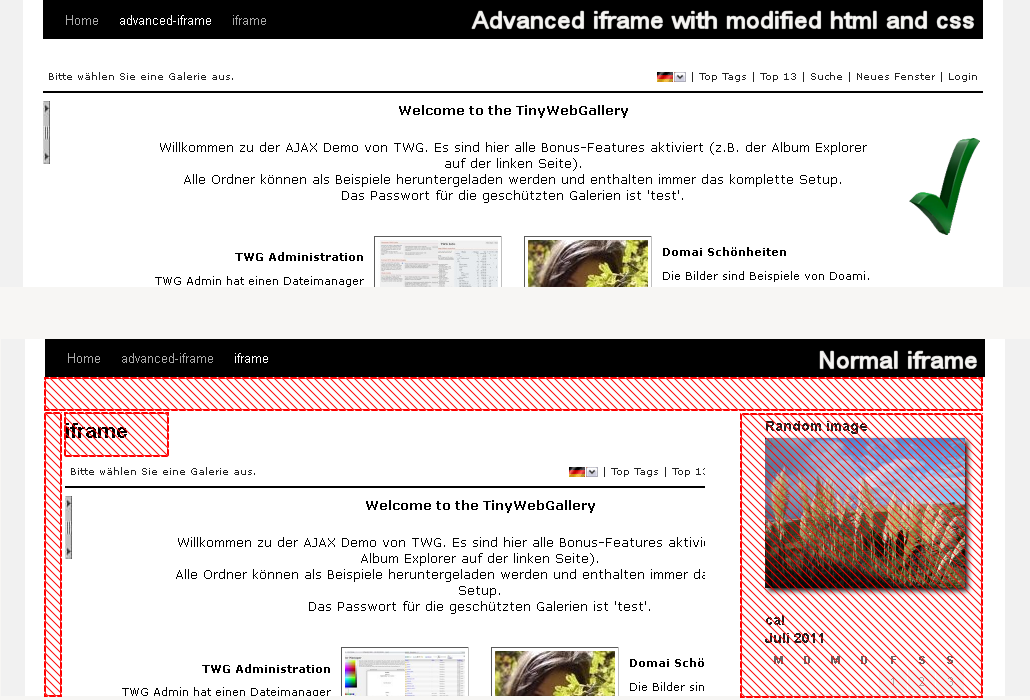
Comparison between normal iframe and advanced iframe wrapper. The red areas are modified by the advanced iframe to display the content better.
Include content the way YOU like in an iframe that can hide and modify elements, does auto height, forward parameters and does many, many more…
Main features of advanced iframe
By entering the shortcode ‘[advanced_iframe]’ you can include any webpage to any page or article.
Advanced iFrame now has out of the box support for embedded 3D models using the p3d 3D viewer. Go to https://p3d.in/b/24 and download a pre-configured plugin where the model does scale already nicely on all devices. Get started for free! If you need more storage or access to the Premium features of p3d.in, you can get a 50% discount on your first payment with the coupon AIFRAME on checkout.
The following cool features compared to a normal iframe are implemented:
- Hide areas of the layout to give the iframe more space (see screenshot)
- Show only specific areas of the iframe when the iframe is on a same domain (The Pro version supports this on different domains) or include parts directly by jQuery
- Modify css styles in the parent and the iframe to e.g. change the width of the content area (see screen-shot)
- Forward parameters to the iframe
- Resize the iframe to the content height or width on loading, AJAX or click
- Responsive videos (moved from the pro to the the free version in v2022)
- Scroll the parent to the top when the iframe is loaded
- Hide the content until it is fully loaded
- Add a css and js file to the parent page
- Security code: You can only insert the shortcode with a valid security code from the administration.
- Many additional cool features are available the pro version – see https://www.advanced-iframe.com/advanced-iframe/advanced-iframe-comparison-chart
In the free version you can update to the pro version directly or test all features in the 30 days trial!
Please note: Modification inside the iframe are only possible if you are on the same domain or use a workaround like described in the settings.
So please check first if the iframe page and the parent page are one the same domain. www.example.com and text.example.com are different domains! Please check in the documentation if you can use the feature you like
A free iframe checker is available at
https://www.advanced-iframe.com/advanced-iframe/free-iframe-checker.
This tool does check if a page is allowed to be included!
All settings can be set with shortcode attributes as well. If you only use one iframe please use the settings in the administration because there each parameter is explained in detail and also the defaults are set there.
Limitations of the free version
The free version has no functional restrictions and is for personal and small non-commercial sites. After 10.000 views/month you have to opt-in to get unlimited views. If you do not opt-in the iframe is still working 100% and at the bottom of the iframe a small notice to opt-in is shown.
Upgrading to Advanced IFrame Pro
It’s quick and painless to get Advanced iFrame Pro. Simply sign up for the 30 days trail or buy directly in the plugin. You can than use the plugin on commercial, business, and professional sites and blogs. You furthermore get:
- Show only specific areas of the iframe even when the iframe is on different domain
- Graphical content selector: https://www.mdempfle.de/demos/configurator/advanced-iframe-area-selector.html
- External workaround supports iframe modifications
- Widget support
- No view limit
- Hide areas of an iframe
- Browser detection
- Change link targets
- URL forward parameter mapping.
- Zoom iframe content
- Accordion menu
- jQuery help
- Advanced lazy load
- Standalone version – can be used in ANY php page!
- And much more…
You can find the comparison chart here: https://www.advanced-iframe.com/advanced-iframe/advanced-iframe-comparison-chart
See the pro demo here:
https://www.advanced-iframe.com/advanced-iframe/advanced-iframe-pro-demo
Administration
- Go to Settings -> Advanced iFrame
Quick start guide
The quickstart guide is also available as video: https://www.advanced-iframe.com/advanced-iframe/advanced-iframe-video-tutorials
To include a webpage to your page please check the following things first:
- Check if your page page is allowed to be included https://www.advanced-iframe.com/advanced-iframe/free-iframe-checker!
- Check if the iframe page and the parent page are one the same domain. www.example.com and text.example.com are different domains!
- Can you modify the page that should be included?
Most likely you have one of the following setups:
- iframe cannot be included: You cannot include the content because the owner does not allow this.
- iframe can be included and you are on a different domain: See the feature comparison chart: https://www.advanced-iframe.com/advanced-iframe/advanced-iframe-comparison-chart and the feature overview https://www.advanced-iframe.com/advanced-iframe/advanced-iframe-features-availability-overview. To resize the content to the height/width or modify css you need to modify the remote iframe page by adding one line of Javascript to enable the provided workaround.
- iframe can be included and you are on the same domain: All features of the plugin can be used.
If you mix http and https read https://www.advanced-iframe.com/iframe-do-not-mix-http-and-https. Parent https and iframe http does not work on all mayor browsers!
Advanced iframe attributes
Below you find all possible shortcode attributes. If you only use one iframe please use the settings in the administration because there each parameter is explained in detail and also the defaults are set there.
Setting an attribute does overwrite the setting in the administration.
[advanced_iframe securitykey=”” src=””
id=”” name=””
width=”” height=””
marginwidth=”” marginheight=””
scrolling=”” frameborder=””
class=”” style=””
content_id=”” content_styles=””
hide_elements=”” url_forward_parameter=””
onload=”” onload_resize=””
onload_scroll_top=”” onload_show_element_only=””
store_height_in_cookie=”” additional_height=””
additional_js=”” additional_css=””
iframe_content_id=”” iframe_content_styles=””
iframe_hide_elements=”” hide_page_until_loaded=””
include_hide_page_until_loaded=””
include_url=”” include_content=””
include_height=”” include_fade=””
onload_resize_width=”” resize_on_ajax=””
resize_on_ajax_jquery=”” resize_on_click=””
resize_on_click_elements=”” use_shortcode_attributes_only=””
onload_resize_delay=””
]


