Adminify Activity Logs
by Liton Arefin on WordPress.org
Track WordPress dashboard activities with this free plugin. Monitor user actions, filter by time, role for complete site security and accountability
The Activity Logs Plugin is a powerful free monitoring tool designed to track and record all user activities within the WordPress dashboard. This plugin provides administrators with comprehensive visibility into user actions, helping maintain security, accountability, and transparency across your WordPress site without any additional cost.
Why Choose Activity Logs?
- Enhanced Security: Identify suspicious activities and unauthorized access attempts
- Complete Accountability: Know exactly who did what and when across your WordPress site
- Simplified Troubleshooting: Quickly trace the source of issues by reviewing recent changes
- Compliance Support: Maintain detailed audit trails for regulatory compliance
- Team Transparency: Improve collaboration by tracking contributions and changes
- Conflict Resolution: Resolve disputes with concrete evidence of actions taken
- Performance Monitoring: Identify resource-intensive activities that may impact site speed
- User Training: Identify areas where users might need additional guidance
- Workflow Optimization: Analyze activity patterns to improve administrative processes
- Disaster Recovery: Understand what changed before problems occurred
- No Additional Costs: All features available completely free to use
Key Features
- 100% Free: All features available at no cost
- Completely Free: Everything included at zero cost – no premium version or hidden fees
- User-Friendly Dashboard: Simple interface that shows all activities in an easy-to-read format
- Real-Time Tracking: See user actions as they happen across your WordPress site
- IP Address Monitoring: Know where users are connecting from for extra security
- Detailed Action Descriptions: Clear explanations of what changed and how it changed
- Multiple Time Filters: View activities from today, yesterday, this week, or this month
- Role-Based Filtering: Focus on specific user roles like Administrators or Editors
- Individual User Tracking: Monitor actions from specific users when needed
- Component Filtering: Look at changes to specific parts of WordPress (posts, plugins, etc.)
- Action Type Filtering: Find specific types of changes (updates, deletions, etc.)
- Customizable Storage Period: Choose how long to keep your activity logs (default: 30 days)
- Searchable Records: Quickly find specific activities with the search function
- One-Click Deletion: Remove individual log entries with a single click
- Low Resource Usage: Minimal impact on your site’s performance
- Multi-Site Compatible: Works across WordPress network installations
- No Configuration Required: Works immediately after activation
Using Activity Logs
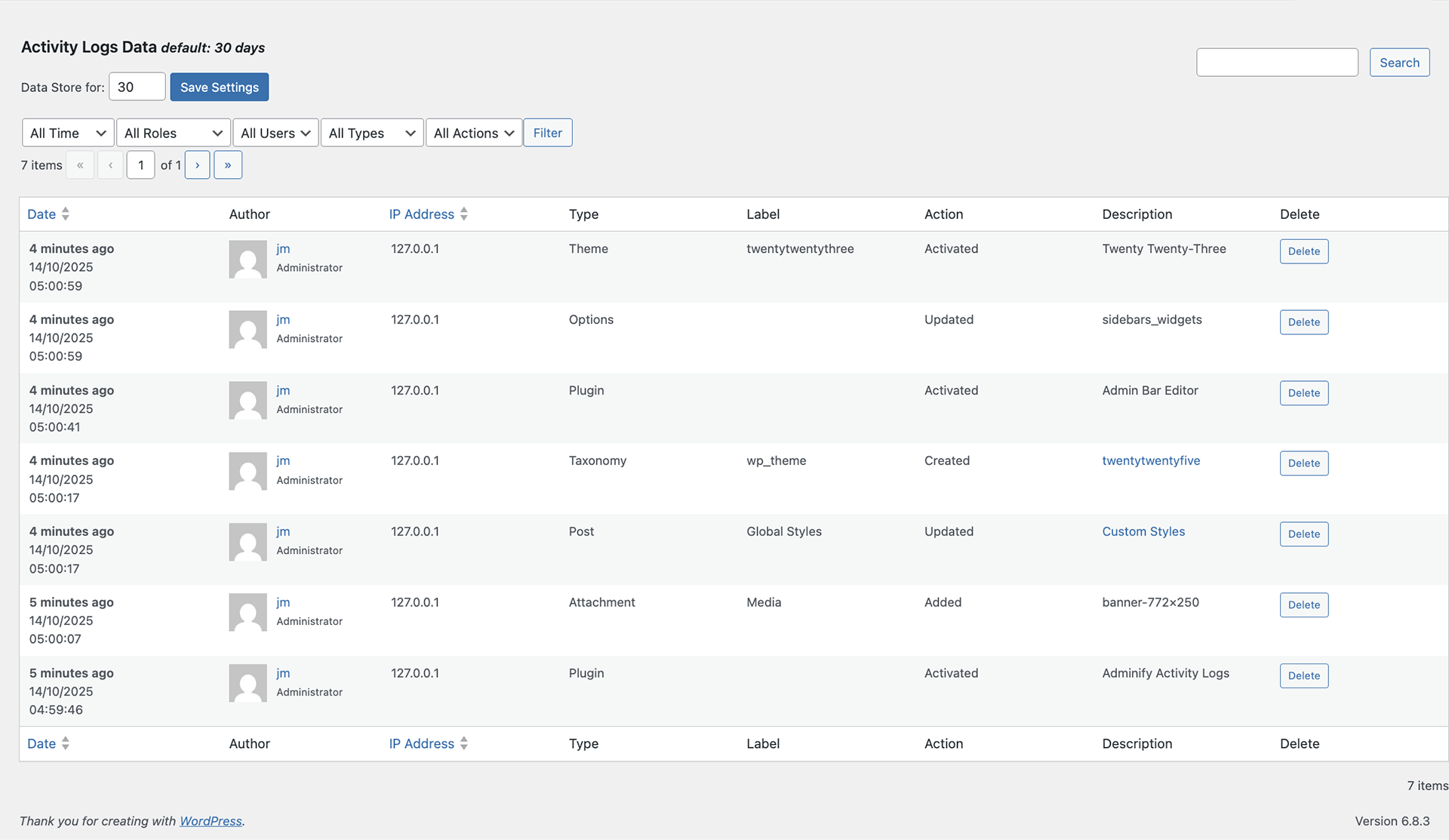
After activation, a new menu item labeled Activity Logs will appear in your dashboard menu. Click on this option to access the activity tracking interface.
Activity Log Information
Each activity entry contains the following information:
Date: Timestamp when the action occurred
Author: Username of the person who performed the action
IP Address: IP information for location tracking
Type: Category of the action (post update, plugin installation, etc.)
Label: Brief description of the activity
Action: Specific operation performed (edited, deleted, added, etc.)
Description: Detailed explanation of the activity
Delete: Option to remove individual log entries
Filtering Capabilities
Time Frame Filters
Filter logs by the following time periods:
All time
Today
Yesterday
Week
Month
Role-based Filtering
View activities by specific user roles:
All roles
Administrator
Editor
Author
Guest
Contributor
Subscriber
Customer
Shop Manager
Any custom roles
User Filtering
All users
Specific users (select individual users to track)
Component Filtering
Track activities related to specific WordPress components:
Attachments
Comments
Options
Plugin
Post
Taxonomy
Theme
User
Action Types
Monitor various types of actions including:
Activated
Added
Approved
Created
Deactivated
Deleted
Installed
Trashed
Unapproved
Updated
Configuration Options
Data Retention: Control how long logs are stored by adjusting the “Data Store for” value (default: 30 days)
Search & Filter: Use the search function to filter logs by specific criteria including users, actions, or keywords
Support
Support Forum
Pre-Sale Questions
Facebook Group
Want More –
If you like our Activity Logs plugin then why not check some other plugins that developed by us:
The best WordPress Dashboard Customization plugin available in the market. With this plugin you will get 18+ modules like Dark Mode, Menu Editor, Folders, Dashboard Widget Manager, Login Customizer, Admin Columns, Activity Logs and many more.
Transform your WordPress Admin Bar (Toolbar) into a tool that works the way you do. The Admin Bar Editor addon lets you fully customize the toolbar, enhancing your WordPress Dashboard Customization experience by allowing you to add, remove, or reorder items for quick access to what matters most.
Create a unique and personalized Custom Login Screen with ease. The Loginfy addon allows you to customize the WordPress login experience, making it consistent with your brand or style, and ensuring a professional appearance for both administrators and users.
Gain precise control over user roles and capabilities with the RoleMaster Suite. This powerful addon provides a comprehensive User Role Editor, enabling you to fine-tune access and permissions, ensuring that each user has the appropriate level of control within your WordPress site.
Keep track of every action on your WordPress site with detailed Activity Logs. Monitor user activities, changes, and updates, providing you with the transparency and insights needed to maintain a secure and well-managed site.
Easily add scripts to your site’s header or footer without touching the code. This addon simplifies the process of integrating tracking codes, custom styles, or scripts into your WordPress site.
Customize the admin columns displayed in your dashboard with the Admin Columns Editor. This addon allows you to rearrange, remove, or add columns, ensuring that your Admin Columns show the most relevant information for your workflow.
Optimize your site’s performance with the Google Pagespeed addon. This tool integrates directly with your WordPress dashboard, providing insights and recommendations to improve your site’s loading times and overall performance.
Create and manage custom sidebars with the Sidebar Generator addon. Easily assign different sidebars to different pages, posts, or custom post types, giving you more control over the layout and content of your site.
Support
For any inquiries, issues, or feature requests, please reach out to us through the support forum on the WordPress plugin repository page.
License
This plugin is licensed under the GPLv3.


