
Admin Commenters Comments Count
by Scott Reilly on WordPress.org
Displays a count of each commenter's total number of comments (linked to those comments) next to their name on any admin page.
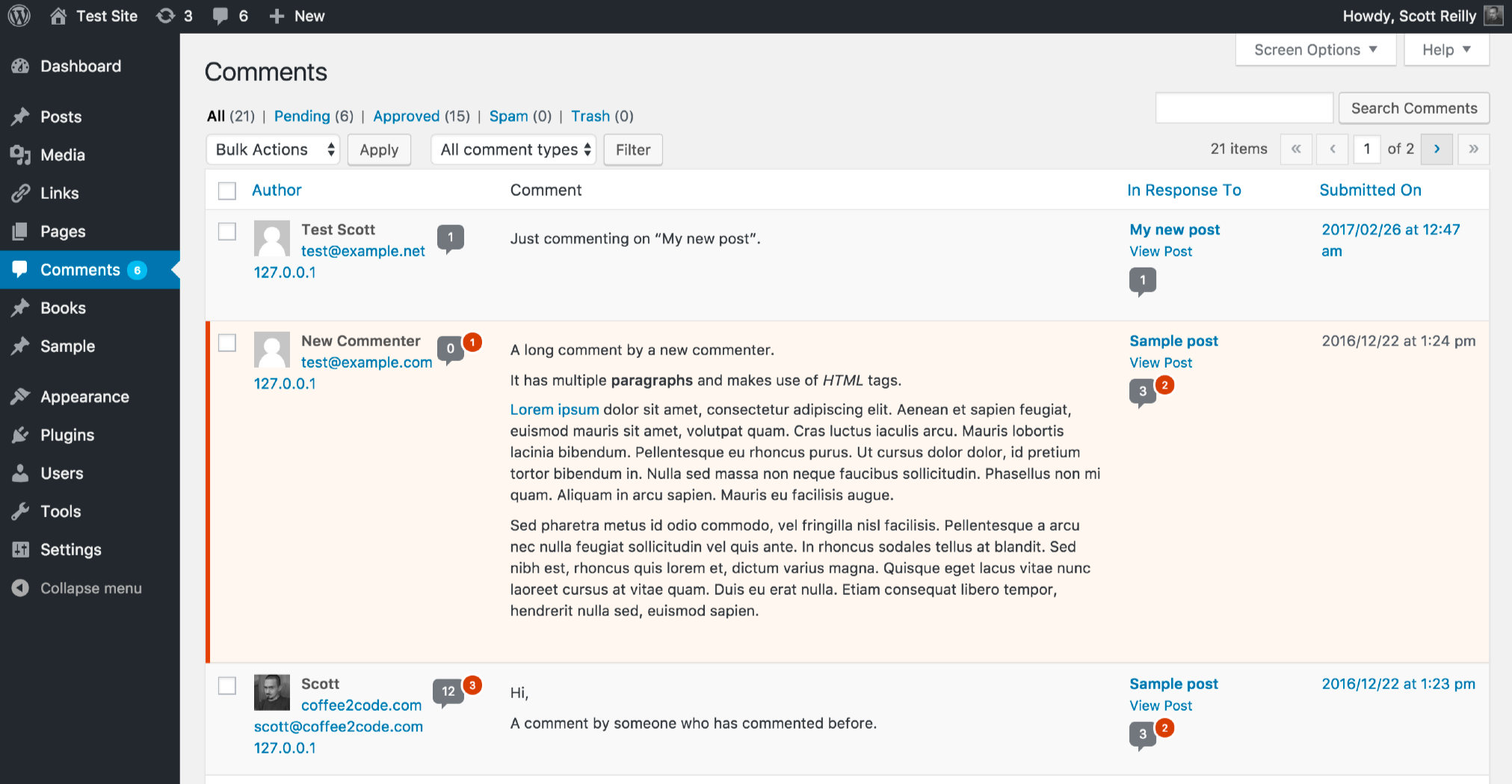
A screenshot of the 'Comments' admin page with the comment count appearing next to the commenter's name. The most recent comment is from someone who has one approved commented on the site. The second comment is from someone who hasn't commented on the site before and has one comment in moderation. The third comment is from someone who has commented 12 times before and has 3 additional comments in moderation.
Next to all appearances of each commenter’s name in the admin, this plugin shows a comments bubble identical to the one shown for posts in the admin listing of posts. The comments bubble shows the number of approved comments for that person and potentially a red superscript circle indicating the number of pending comments for the person (assuming they have any). The comment counts are linked to listings of comments associated solely with that particular commenter.
By default in WordPress, it is not possible to tell via a single glance whether a particular commenter has commented before or how many times the’ve commented.
This plugin adds this handy capability to the WordPress admin pages that allows you to:
- Quickly identify a first-time commenter
- Quickly identify unfamiliar commenters that have in fact commented before
- Quickly see how many total comments a particular commenter has made, and how many comments are pending
- Easily navigate to a listing of all approved comments and all moderated comments by a commenter, in order to see what post and when they last commented (or first commented), get a feel for the nature of their comments, or find something they’ve said in the past
Specifically, the linked comment count appears next to commenters in:
- The “Comments” listing of comments (including comment search results)
- The “Comments for ‘POST_TITLE'” listing of post-specific comments
- The “Discussion” box of the “Edit Post” page for a post with comments
- The “Recent Comments” admin dashboard widget
- The “Users” listing of users (as the column “Comments”)
Commenters are identified by the email address they provided when commenting. If your site does not require that commenters submit their email address when commenting, this plugin will use the commenter’s name as the identifier, though since this is a publicly viewable piece of data it’s possible that multiple people could be posting under the same “name”, so this method has the potential to be not as accurate.
Links: Plugin Homepage | Plugin Directory Page | GitHub | Author Homepage


