
Add to Calendar Button
by Add to Calendar on WordPress.org
Create beautiful buttons, where people can add events to their calendars. Highly customizable. As shortcode or via a convenient block.
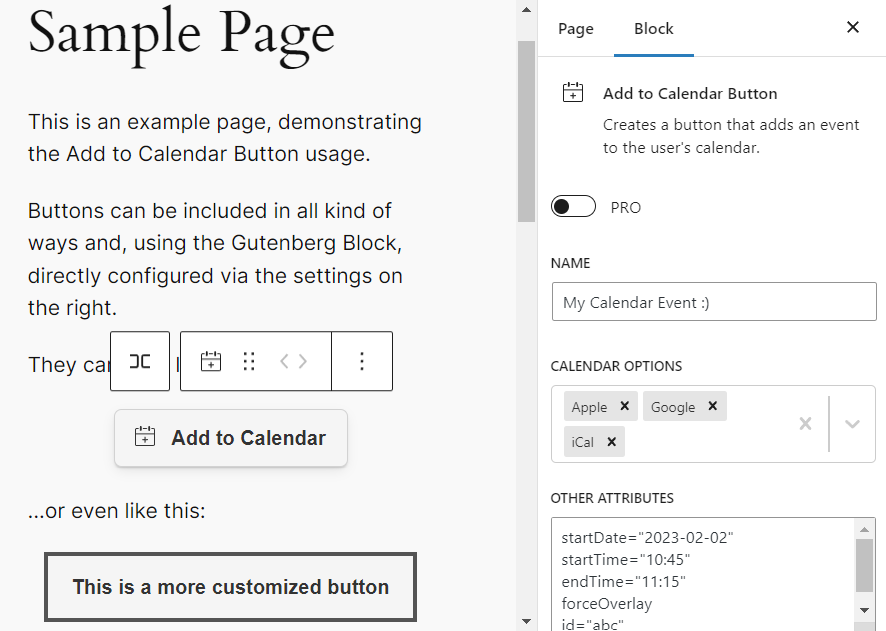
Add to Calendar Buttons can be used as Blocks, which enables you to directly see how it will look like on the final website.
Make your events get saved.
This WordPress plugin lets you create beautiful buttons with calendar links, where people can add events to their calendars.
All of this with just a few clicks and highly customizable, using the popular Add to Calendar Button script.
Check out the official website for a comprehensive demo and overview.
🛠️ INTEGRATED IN SECONDS
You can either use the shortcode [add-to-calendar-button] or the Gutenberg Block.
With the PRO version, it only takes the ID to make it fly.
In the no-PRO case, you simply place the necessary attributes directly in the shortcode, or at the Gutenberg Block settings.
(Mind that you cannot use ‘[‘ and ‘]’ characters, when going for the shortcode option! For content formatting, you can use {‘{‘}xxx{‘}’} instead of [xxx] there.)
🚀 GO PRO
Go even further with the PRO version…
Manage all details and styling via a convenient web app.
Use the same button to let people RSVP to your events – fully managed.
Get auto-generated landing pages and shareable links for your events.
Have better guidance for your users, when they add events to their calendars and things don’t go as expected.
👉 Learn more at add-to-calendar-pro.com.
✨ SUPPORTED CALENDARS
- Google Calendar.
- Yahoo Calender.
- Microsoft 365, Outlook, and Teams.
- Automatically generated iCal/ics files (for all other calendars, like Apple).
📆 SUPPORTED EVENT TYPES
- Timed and all-day events.
- One-time, multi-date, recurring.
- Most robust time zone and daylight saving management.
- Dynamic dates (like “today + 3”).
🎨 ADJUST THE LOOK
The button comes with multiple themes as well as a dark and light mode.
You can easily adjust almost every element by setting the respective simple attributes.
In case you want to go all-in, you can also manipulate all kinds of colors and further styling.
🖖 EXPERT ACCESSIBILITY
- Optimized and adjustable UX (for desktop and mobile).
- Dynamic dropdown positioning.
- Taking care of all those edge cases, where some scenarios do not support specific setups (like WebView blocking downloads); utilizing beautiful user guidance workarounds.
- Auto-generated Schema.org rich (structured) data for better SEO.
- Full support for mouse, touch, or keyboard input (W3C WAI compliant).
- Aside from the WordPress editor, the button itself supports 20+ languages, incl. RTL text for Arabic; but also offers the option to customize all labels and text blocks.
📄 ABOUT THE LICENSE
Mind that the script to actually generate the Add to Calendar Button uses the Elastic License 2.0 (ELv2)!
This usually comes with no restrictions for you, but it forbids you to rework the core script and provide the product (generating an add-to-calendar-button) to others as a managed service.
In almost every case, this will not affect you. If you are not sure, because you are building some kind of SaaS, where you are using the plugin, simply contact us.